Category: General

  • Security trimming the SharePoint Ribbon

    Security trimming the SharePoint Ribbon

    The SharePoint 2010 ribbon control provides various toolbars used by content authors and contributors, particularly when creating and editing Publishing pages.

    But what if your organization doesn’t want to allow certain user groups to change formatting, or select different fonts, in order to maintain a standardized style.  In this case, dynamically changing the ribbon control based on the user’s permissions or group membership allows an organization to determine what and how a user may do while editing content.

    The default Edit Ribbon displays as follows when the user selects an HTML content area:

    default edit ribbon

    Here are the revisions to the ribbon we will make.  Some buttons will be removed altogether, and others will be security trimmed.

    Desired trimmed ribbon

    Creating a custom Ribbon Trimming Control

    To apply the changes to the ribbon, we’ll create a basic control that can be added to the Master Page.  Start by creating a new Empty SharePoint Project in Visual Studio 2010.

    Add references to System.Web and Microsoft.Web.CommandUI.

    Add a class to the project as follows:

    using System;
    using System.Web.UI;
    using System.Web.UI.WebControls;
    using System.Web.UI.WebControls.WebParts;
    using Microsoft.SharePoint.WebControls;
    using Microsoft.SharePoint;
    
    namespace MyApp.TrimRibbon
    {
      public partial class RibbonSecurityTrimmer: UserControl
      {
        protected void Page_Load(Object sender, EventArgs e)
        {
          SPRibbon ribbon = SPRibbon.GetCurrent(this.Page);
          if (ribbon != null)
          {
            //remove following controls for all users
            ribbon.TrimById("Ribbon.EditingTools.CPEditTab.Font.Fonts");
            ribbon.TrimById("Ribbon.EditingTools.CPEditTab.Font.FontSize");
            ribbon.TrimById("Ribbon.EditingTools.CPEditTab.Font.FontColor");
            ribbon.TrimById("Ribbon.EditingTools.CPEditTab.Font.FontBackgroundColor");
            ribbon.TrimById("Ribbon.EditingTools.CPEditTab.Markup.LanguagesLabel");
            ribbon.TrimById("Ribbon.EditingTools.CPEditTab.Markup.Languages");
    
            //remove View HTML markup control for anyone who does not have Full Control rights to the site.
            if (!SPContext.Current.Web.DoesUserHavePermissions(SPBasePermissions.FullMask))
            {
              ribbon.TrimById("Ribbon.EditingTools.CPEditTab.Markup.Html");
            }
          }
        }
      }
    }

    Create a Feature to deploy this project’s assembly in to the GAC.
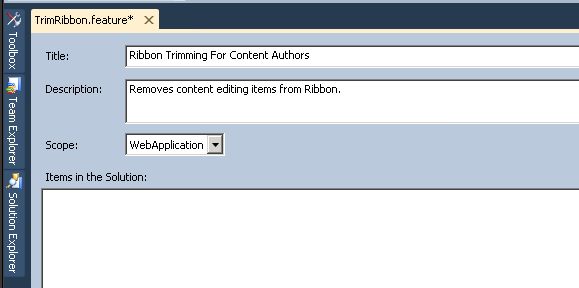
    RibbonTrim Feature

    Be sure to set the Scope to WebApplication so the assembly is globally available.

    Set up the deployment package to include the Feature you just set up.  Keep in mind you’ll need to ensure that a Safe Controls entry is added to the web.config file for the web application during deployment.  

    Deploy to the SharePoint farm and activate the Farm solution.  The assembly should be provisioned in to the GAC (which you can confirm by opening Windows Explorer to c:\windows\assembly.)

    Updating the Master Page

    Open Master Page (either in a branding solution, or using SharePoint Designer)

    Add Register tag before the <html> tag to pull in Assembly.

    <!-- Ribbon Trimming Control -->
    <%@ Register TagPrefix="MyApp" Namespace="MyApp.TrimRibbon" Assembly="MyApp.TrimRibbon, Version=1.0.0.0, Culture=neutral, PublicKeyToken=bda84fa329198d63" %>

    Add the control tag in Body section of Master Page.

    <!-- control to trim ribbon -->
    <MyApp:RibbonSecurityTrimmer id="RibbonTrim1" runat="server"/>

    Save and deploy master page.  If you’re using SharePoint Designed, check in and publish your changes.

    To confirm the security trimming is applied, load a page that uses the Master Page you modified, go in to edit mode, and view the revised ribbon.

    Here it is for a user without Full Control rights

    trimmed ribbon

    Here it is for a user with Full Control rights (notice the return of the HTML drop down near the right side.)

    trimmed ribbon full control

    MSDN has a full list of the enumerated SharePoint Permissions and a list of the button control ID values.

    This blog post maps those permissions to the Permission levels typically associated to SharePoint groups.

    Using this approach, you can easily create different variations of the Ribbon for each group of authors, contributors or editors, just by applying different checks using the SPContext.Current.Web.DoesUserHavePermissions method.

    If you need to add additional parameters to control the trimming, you can do that by exposing public properties in your class and setting them in the control tag when you place it on the Master Page.


  • Replaceable parts and software design

    Replaceable parts and software design

    This past weekend I replaced the brake pads and rotors on my car.  It took a couple hours, cost about $90 in parts, and left me not just with a sense of achievement and personal satisfaction, but a with lots of thoughts about how mechanical systems work, how standardization should function, and how these things translate into the world of software design and development.

    brakes

    The aftermarket auto parts industry is huge.  In my area, there are at least 3 national brand auto parts retailers.  They stock thousands of parts for hundreds of makes, models, and versions of automobiles.  They can do this because of standards.  A brake pad for my vehicle can be made by aftermarket manufacturers because they can develop against a standard, ensuring the part will fit and perform as expected in my car.  Most of these aftermarket brands boast how they “meet or exceed the original equipment manufacturers standards…”

    As an end user of my vehicle, if I am so inclined, I can perform the task of replacing worn out parts with new parts.  I can do this in many cases without any particular training or expertise, or the need for specialized tools.  I simply dismantle and remove the old part, and install the new part.  And most of the time, it just works.

    But when was the last time an end user could replace a broken block of code with a different block from another manufacturer?  

    Never?  Rarely?  Oh, silly man, that’s not how software works!

    I concede, a hunk of metal is a lot different than code that can contain logical or programmatic errors.  If the metal wears out or doesn’t perform, we just cast another one and put it in its place.

    There are a few key points that emerge in this discussion.

    • Ownership versus Licensing
    • Open versus Closed Source
    • Software aging and reuse

    Ownership vs. Licensing

    When I purchase an automobile, I (or the bank) own it outright.  There may be a manufacturer’s warranty in force, but the manufacturer has no claim to the tangible asset.  It becomes my property, and I am largely free to do with it what I want.

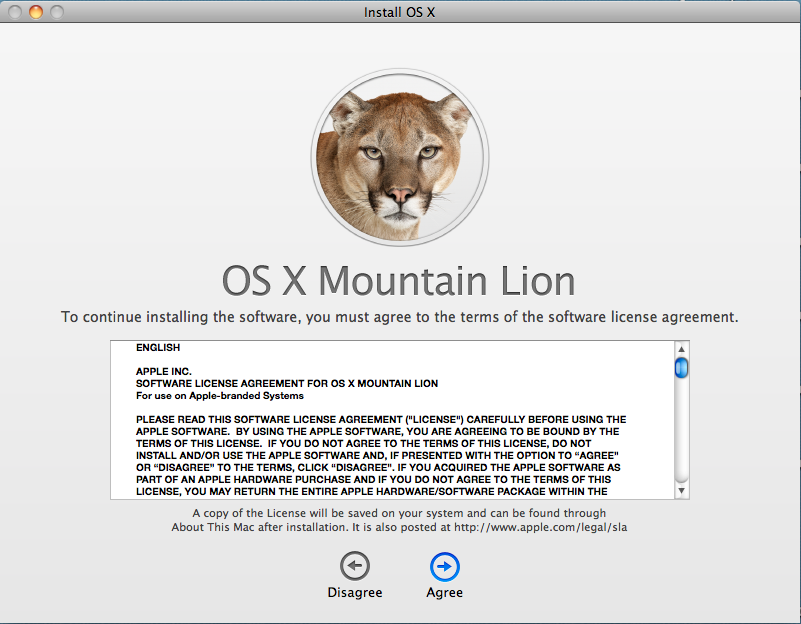
    Software is a different animal because it is a licensed product.  In the majority of cases, what I buy when I purchase a piece of software is permission to use the product, not the product itself.  For example, here is the first clause from the OS X Mountain Lion license agreement (emphasis mine):

    1. General.
    A. The Apple software (including Boot ROM code), any third party software, documentation,
    interfaces, content, fonts and any data accompanying this License whether preinstalled on
    Apple-branded hardware, on disk, in read only memory, on any other media or in any other form (collectively the “Apple Software”) are licensed, not sold, to you by Apple Inc. (“Apple”) for use only under the terms of this License. Apple and/or Apple’s licensors retain ownership of the Apple Software itself and reserve all rights not expressly granted to you.

    Thus, by agreeing to the license, I have no right or authority to modify, enhance, customize or otherwise repair the code.  I must take it as is, trusting that it will work as expected.  If it doesn’t, I am at the mercy of the producer to deliver a patch.  Otherwise, I’m stuck.

    (Note: for a far more educated perspective on this topic, I recommend the Freedom to Tinker blog by Princeton University professor Ed Felton.)

    Open Source vs. Closed Source

    The advent of Open Source software in the late 1990s challenged this traditional form of licensing by opening up the ability to view, change and customize the code covered by the license.  Still, most commercial software is closed source and tightly guarded by its licensing terms.  My ability to modify the functionality of the product is limited to the configuration settings or integration points exposed by the creator.

    Software Aging and Reuse

    Generally speaking, software doesn’t wear out.  The code written 10 years ago, given a suitable runtime environment, should still work.  A one is still a one, and a zero is still a zero.  Unlike my brake pads, which degrade every time they are used (albeit ever so slightly), software code does not break down with each subsequent execution (unless of course it was designed to do so.)

    Most software improvements and future versions are created to add features and repair bugs.  In some cases, producers may rewrite products from the ground up in order to take advantage of the available tools, hardware specs, and methodologies that are in play at the time.  But the old code, left as is, doesn’t stop working just because it is old and has been used repeatedly.

    So if software doesn’t wear out and is not mine to modify, is there a comparison to the replaceable parts of my car?  I still think so.

    Designing for change

    Software in its own way is purposefully rigid.  You want it to do one thing well.  Until you don’t.  At that point you want the flexibility to make it behave differently.  And if you are so inclined, you’d love to do it yourself.

    Not all products do this because designing in that kind of flexibility takes more time, costs more money, and requires more effort.

    The best example I know of such a product is the very tool I am using to share these thoughts.  WordPress has a pretty amazing capacity to accept add-ons from 3rd party developers.  As an end user, if I want my blog to have advertising, or my Twitter feed, or be an ecommerce site, I don’t have to wait until the WordPress creators add these features as officially sanctioned behaviors.  I simply add a plug in.  If the first one (or ten) I check out don’t do it the way I want, I have more to select from.  If all else fails, I can write my own.

    The internet browser is another class of software that is becoming more modular.  Whether they are called ‘add-ons‘ or ‘extensions‘ or ‘accelerators‘, they all serve to let me as the end user tweak and adjust how the product works.

    Perhaps these plug-ins are more akin to putting a new stereo in my dashboard to replace the factory installed unit than they are to replacing a worn component.

    Designing modular, extensible software can be a challenge.  I believe though that there are certain advantages to do so, particularly for consumer products.  Now it’s time to press software creators for more of that freedom.

  • Upgrading to OS X Mountain Lion

    Upgrading to OS X Mountain Lion

    I’ve decided to roll the dice with my first Mac OS X upgrade.  The real motivation is not any disappointment with version 10.6.8 but a desire to purchase Keynote, which requires OS X 10.7.4 or later.

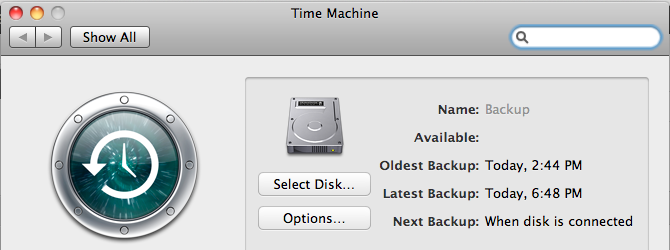
    First, I used Time Machine to make a full disk backup to a USB drive.  I have a 250GB drive in my Mac, and Time Machine picked up about 180GB.  It took roughly 12 hours to initialize Time Machine and get all that data copied.

    Time Machine

    Next comes purchasing OS X Mountain Lion from the App Store.  I swear, spending money is way too easy.  But the $19.99 purchase price is quite reasonable (compared to $119.99 for Windows 8). As soon as the App Store purchase goes through, the download begins.

    Mountain Lion Download

    The full download is stated to be 4.4GB.  It took roughly 90 minutes to complete, and the installer launched automatically.

    Welcome page.

    ML Install

    Terms and Conditions

    Terms and Conditions

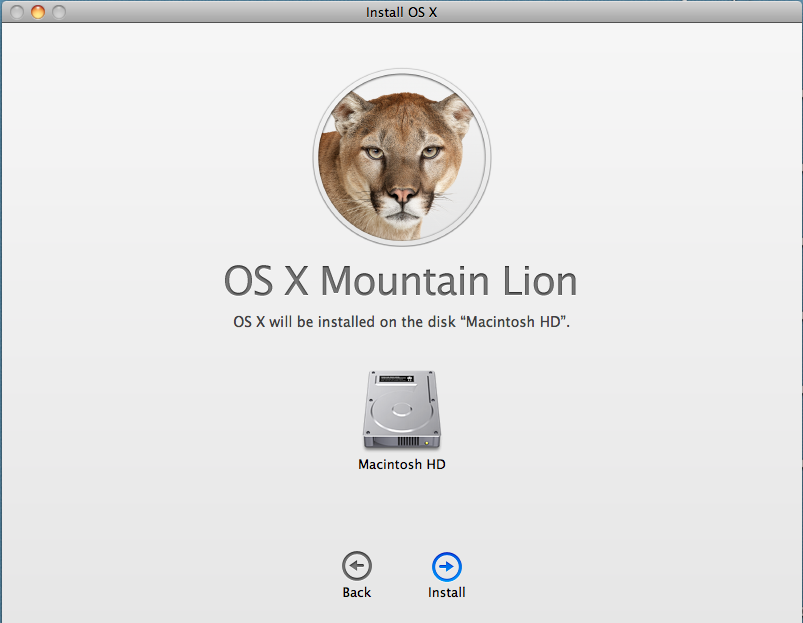
    Select Destination Drive
    ML Destination

    Start Installation

    ML Installing

    After this initial unpacking, a restart kicks off the main installation.  As expected, the install screens carried a certain polish to them.

    The full install phase took about another 45 minutes or so.  I then saw the new OS X Mountain Lion login screen.

    After logging in, another setup sequence followed to provide my Apple ID, accept the collection of Terms and Conditions, and elect to set up iCloud and Messaging.

    All told it was about 3 hours elapsed from start to finish.

    I will note a couple post-upgrade observations.  First, the Mail app has been upgraded, and so all of my mailboxes and their data needed to be upgraded as well.  I have several mail accounts and this process took about 30 minutes.

    Lastly, Time Machine had to kick off a new backup of about 20GB.  I’m guessing much of this is the  Mountain Lion download and unpacked files.  At first glance, it was hard to tell if my pre-upgrade backups were still valid or even available.

    Apple has done well to deliver a painless upgrade experience at a reasonable price.

  • The Internet thinks I am 5 years old.

    The Internet thinks I am 5 years old.

    In the early days of the good old World Wide Web, the emerging anonymity was often summed up with the cartoon “On the Internet, nobody knows you’re a dog.” published in 1993.

    Now, 20 years later, not only does the Internet know you’re a dog, it knows whether you’re a mutt or a purebred; whether you like rawhide or stuffed squirrels; and if Eukanuba ends up in your online cart more often than Iams.  Our digital trail is captured on every purchase, every tweet, and every wall post.

    amz-1Many online services use this history to ‘aide’ me as a consumer.  Amazon may have been the first to pioneer a robust recommendation engine based on past purchases.  But now services like Netflix, Pandora, Facebook, and even my local newspaper’s site all make attempts to pique my interest based on whatever they know about me.

    And quite frankly, they suck at it.

    It’s not that they don’t properly analyze the data.  It’s that they allow the data to be polluted.  And in my world, the biggest polluter of my digital persona is none other than my kindergartner.

    I have had a Netflix account since 2008.  I have probably watched a few hundred movies and TV episodes.  In 2010 I got a Roku, and my Netflix account became more accessible, allowing me to dial up Mythbusters or Top Gear whenever I wanted and watch on my TV.  Shortly thereafter, however, a shift occurred.  Suddenly, my recommendations started looking like this:

    nf-1and

    nf-2

    To their credit, Netflix has announced they will be introducing “personalized profiles” in the near future, undoubtedly in response to an endless stream of emails from fathers who, in fact, don’t have an interest in Tinkerbell or Babar they way Netflix thinks they do.

    My internet persona is becoming an amalgam of my entire family.  We have one Amazon Prime account, under my wife’s email.  So as far as Amazon is concerned, she not only likes theology books, but also electronics gear and tech books.  Polluted.  But why would I pay another $80 a year to have my own Prime account?

    We experience the same challenge with our recently purchased iPad.  In many ways it is a ‘family’ device, used by mom, dad, and kids alike.  But it’s my iTunes account associated with the device, so Apple is left to believe that I like Hay Day and PBS Kids as much as I like Evernote and CNBC.

    The problem of ‘householding’ isn’t new.  Just ask any direct mail business or non-profit who gets separate donations from husband and wife.  But you want to believe that we are getting better in this technological age.  Unfortunately, the progress is slow.

    While I wait, I guess I’ll enjoy another Feel Good Talking Animal show.

  • Studying for MS Exam 70-480

    This month I have been studying to take the Microsoft certification exam 70-480: Programming in HTML5 with Javascript and CSS3.

    The first resource I leveraged was Microsoft Virtual Academy and the freely available online video course presented by Jeremy Foster and Michael Palmero.  It did provide a cursory overview of the topics in the exam, though in the context of Windows 8 development first, with web development second.  One thing that irritated me about this material was the downloadable PDFs of the slide decks Jeremy and Michael used.  You would get lots of slides of agenda points, and lots of slides indicating where a demo would occur, but very few slides with actual explanation or code samples.  All in all, these videos were useful, and after I downloaded them on to my iPad, were portable, which helped allow me to study in situations where I did not have a network connection.

    One resource that I would not have originally considered was Slideshare.net.  Here I found several decks containing sample questions.  They were often (always?) from beta versions of the exam, and rarely had any explanations for the correct answers, but they did provide what I thought was a decent representation of the format and types of questions.

    Another set of resources I found helpful were other people’s study guides, specifically:

    Also helpful was jsfiddle.net, which was great to try out and experiment with many of the methods and techniques in HTML5, CSS3 and Javascript.  An example of a Fiddle I created is listed below.

    CSS3 Flexbox
    https://jsfiddle.net/SHn7S/

    UPDATE:  I passed this exam, and am now starting to study for exam 70-486: Development ASP.NET MVC 4 Web Applications.

  • Migration for site failed: Object reference not set to an instance of an object.

    Converting a SharePoint 2010 web application from Classic mode authentication to Claims Mode authentication is fairly well documented.

    After enabling claims mode, it is necessary to use the MigrateUsers() method to reformat the permissions entries in the Content Databases to reflect the Claims mode format.

    I have done several such conversions before without error, but this past weekend I tried another one for a client and ran in to an unusual error.

    The Web Application contained 3 content databases, and 4 site collections.

    The MigrateUsers call appeared to run successfully, and it reported no errors to the Powershell session.

    As we were testing access to the site collections, however, it became clear that one of the site collections had not been converted.

    In reviewing the ULS logs, the following entry revealed that an error had occurred during the run of the MigrateUsers method:

    Migration for site <null> failed: Object reference not set to an instance of an object.
    at
    at Microsoft.SharePoint.Administration.SPWebApplication.LogMigrationError(String name, String objectType, Exception e)
    at Microsoft.SharePoint.Administration.SPWebApplication.MigrateDatabaseHelper(SPContentDatabase database, SPCommonMigrateUserParameters commonParams, Dictionary`2 processedOldLogins)
    at Microsoft.SharePoint.Administration.SPWebApplication.MigrateUsers(IMigrateUserCallback callback)
    at MigrateUsers(Object , Object[] )
    at System.Management.Automation.DotNetAdapter.AuxiliaryMethodInvoke(Object target, Object[] arguments, MethodInformation methodInformation, Object[] originalArguments)
    at System.Management.Automation.DotNetAdapter.MethodInvokeDotNet(String methodName, Object target, MethodInformation[] methodInformation, Object[] arguments)
    at System.Management.Automation.Adapter.BaseMethodInvoke(PSMethod method, Object[] arguments)
    at System.Management.Automation.ParserOps.CallMethod(Token token, Object target, String methodName, Object[] paramArray, Boolean callStatic, Object valueToSet)
    at System.Management.Automation.MethodCallNode.InvokeMethod(Object target, Object[] arguments, Object value)
    at System.Management.Automation.MethodCallNode.Execute(Array input, Pipe outputPipe, ExecutionContext context)
    at System.Management.Automation.ParseTreeNode.Execute(Array input, Pipe outputPipe, ArrayList& resultList, ExecutionContext context)
    at System.Management.Automation.StatementListNode.ExecuteStatement(ParseTreeNode statement, Array input, Pipe outputPipe, ArrayList& resultList, ExecutionContext context)
    at System.Management.Automation.StatementListNode.Execute(Array input, Pipe outputPipe, ArrayList& resultList, ExecutionContext context)
    at System.Management.Automation.ParseTreeNode.Execute(Array input, Pipe outputPipe, ExecutionContext context)
    at System.Management.Automation.ScriptCommandProcessor.ExecuteWithCatch(ParseTreeNode ptn, Array inputToProcess)
    at System.Management.Automation.ScriptCommandProcessor.RunClause(ParseTreeNode clause, Object dollarUnderbar, Object inputToProcess)
    at System.Management.Automation.CommandProcessorBase.DoComplete()
    at System.Management.Automation.Internal.PipelineProcessor.SynchronousExecuteEnumerate(Object input, Hashtable errorResults, Boolean enumerate)
    at System.Management.Automation.Runspaces.LocalPipeline.InvokeHelper()
    at System.Management.Automation.Runspaces.LocalPipeline.InvokeThreadProc()
    at System.Management.Automation.Runspaces.PipelineThread.WorkerProc()
    at System.Threading.ExecutionContext.Run(ExecutionContext executionContext, ContextCallback callback, Object state)
    at System.Threading.ThreadHelper.ThreadStart()

    I’ll trim out the awful details of sitting on the phone with Microsoft technical support, and jump right to the fix.

    It turned out that when this SharePoint farm was upgraded from 2007 to 2010, there was a residual site collection in one of the content database.  Further, it so happened that this site collection had the same name and url as a sub site in another site collection.

    It appeared that as the MigrateUsers method was iterating through the site collections, it would follow the url to open the site collection and retrieve the users in order to convert them.  In this case, however, the url led not to a site collection, but a sub site, and thus the ‘Object reference not set to an instance of an object.’ error occurred.

    After confirming that the residual site collection was unused and contained no content, I (nervously) deleted it in Central Administration.

    I then re-ran the MigrateUsers() method, and it successfully converted the users for all site collections, and users were able to authenticate properly to the sites.

    I recognize this is an unusual situation due to the particular data in this installation.  But having found very little information about any such case, I wanted to share my experience.

  • Fun with Guids – SharePoint 2010 edition

    While working this week on a SharePoint 2010 installation,  I noticed the following entries in the web.config file.  Kind of a Guid easter egg.

    <Action id="0ff1ce14-0001-0002-0000-000000000000" sourceFile="C:\Program Files\Common Files\Microsoft Shared\Web Server Extensions\14\config\webconfig.osrv.xml" />
    <Action id="0ff1ce14-0001-0003-0000-000000000000" sourceFile="C:\Program Files\Common Files\Microsoft Shared\Web Server Extensions\14\config\webconfig.osrv.xml" />
    <Action id="0ff1ce14-0001-0004-0000-000000000000" sourceFile="C:\Program Files\Common Files\Microsoft Shared\Web Server Extensions\14\config\webconfig.osrv.xml" />
    <Action id="0ff1ce14-0001-0005-0000-000000000000" sourceFile="C:\Program Files\Common Files\Microsoft Shared\Web Server Extensions\14\config\webconfig.osrv.xml" />
    <Action id="0ff1ce14-0001-0006-0000-000000000000" sourceFile="C:\Program Files\Common Files\Microsoft Shared\Web Server Extensions\14\config\webconfig.osrv.xml" />

    I have to imagine these are the 3am decisions that go on at Microsoft during the height of product development.

  • How to create a 5 year career plan

    How to create a 5 year career plan

    Every year as I prepare for my annual review, I take the opportunity to look back and reflect on the year’s achievements (and challenges).  Equally important, though, is to look and plan ahead for the future chapters in my career.

    This year, I have been working through recalibrating my 5 year career plan, and in doing so, thought I would capture the criteria and considerations that weigh in to the planning effort.

    Debt/Income review
    An obvious output of my career is earning an income, and using that income to pay for living expenses, debt, and contribute to savings (both long term and short).  So in planning out the next five years, I lay out the income I want to achieve, and how that translates in to either percentage raises each year, or the need to move to a higher pay scale through changing roles or employers.

    Family Unit review (how old will kids be?)
    At present I have 2 kids, ages 5 and 3, with another coming in the next few months.  As I plan out 5 years, I have to think about life with a 5, 8 and 10 year old.  For me, one thing that is especially important is being able to participate in and support my kids in their academics and extra-curricular activities.  So I have to think about a career path that will afford me the flexibility to go watch after-school sporting events, for instance.  Similarly, reflecting on and evaluating how my employer values family is a big part of this review.

    Career trajectory (dev -> lead -> PM -> Mgr -> Exec)
    I have always assumed an upward mobility in my career, with each change in position providing increases in responsibility, income and influence.  In truth, my career path has had a bit more of a sawtooth pattern, as I rise through the ranks, then return to a mostly developer role before rising up again.  There really is no wrong answer here, but one should determine where they want to move towards in order to be able to determine if their current position or role is supporting that goal.  Additionally, does your employment situation offer opportunity for growth and promotion?

    Skills (are there new skills I need/want to learn)
    For a short period of time I held a contract with a state agency.  While there were a lot of things about working for Government that did not appeal to me, one thing this agency did particularly well was enact a commitment to training their employees.  All the full time staff in the group in which I worked were expected to identify and take 40 hours of outside training each year.  This time was factored in to the budgets and planning of all the projects.  In many ways, I had not seen an employer be so faithful to a professional development initiative as that agency.

    As part of my career plan, I have to evaluate my current skill sets and identify the areas where I want to improve or expand.  From that, I have to evaluate my employer’s interest, commitment and willingness to invest in professional development.

    Business type
    Somewhere along the line of my career planning, I determined that I wanted to work in a variety of businesses.  These included:

    • owning my own business
    • working for a small business
    • working for a non-profit
    • working for a government
    • working for a publicly traded company
    • working for a large (nationally recognized) company

    As I consider my current employment state, and thus current employer, is it helping me achieve this goal of having a diversity of workplace experiences?

    Using this framework has been helpful for me to think about and prioritize my career plan.

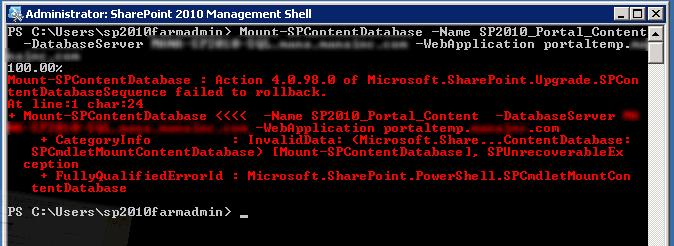
  • Action 4.0.98.0 of Microsoft.SharePoint.Upgrade.SPContentDatabaseSequence failed.

    While attempting to perform a SharePoint 2007 to SharePoint 2010 upgrade using the Database Attach Method this weekend, I ran into an error I hadn’t seen before:

    Action 4.0.98.0 of Microsoft.SharePoint.Upgrade.SPContentDatabaseSequence failed.

    Looking in to the Upgrade Error log file, I found the culprit:

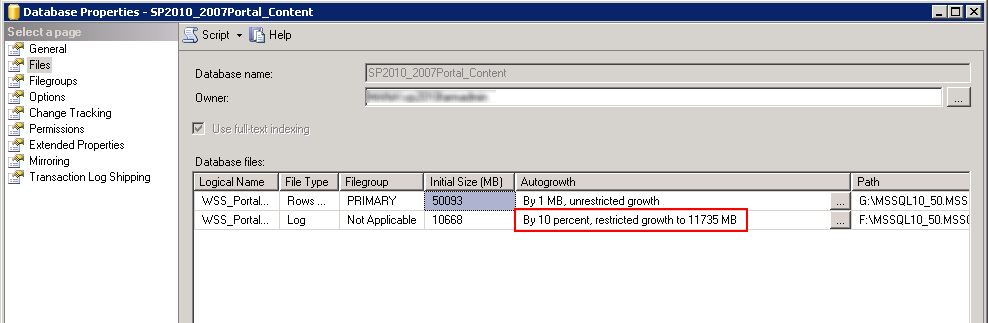
    [powershell][/powershell][SPContentDatabaseSequence] [ERROR] [9/30/2012 1:03:13 PM]: Exception: The transaction log for database ‘SP2010_2007Portal_Content’ is full. To find out why space in the log cannot be reused, see the log_reuse_wait_desc column in sys.databases

    It turns out that the database I had restored had a Maximum Size setting for the transaction log.  The Property pages for the Database revealed this fact:

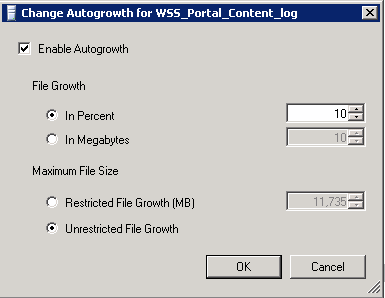
    I went ahead and changed the autogrowth settings to allow unrestricted growth.

    I then retried the Upgrade/Mount of the database and it went through without any errors.

  • Why every app should have a status page.

    Many years ago, after receiving a promotion, I finally was able to accomplish a goal I had set out for myself.  I bought a BMW.  The 10 year old 325i the car I had fallen in love with and was now in a position to acquire.

    One of my favorite features of the car was a small collection of red lights positioned above the windshield.  Every time you’d start the car, these lights would all come on, then one by one they’d go out.  Each light corresponded to a certain system or status check being run.  If a light stayed lit, it meant you might have a tail light out, or be low on windshield washer fluid.  It was, in my view, one of those elegant demonstrations of German engineering.

    As a developer, getting status on a system is a fundamental part of ensuring proper behavior, diagnosing issues, and validating assumptions.  And so I have come to always ensure that the apps I develop have a status page, and I encourage you to do so as well.

    There are some essential things to check:

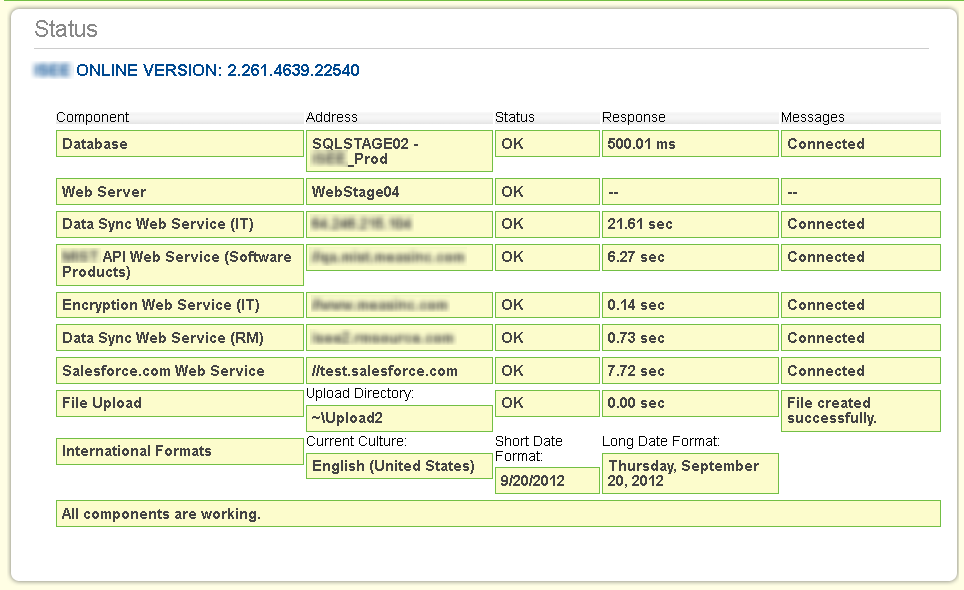
    1. Can I connect to the database?
    2. Can I upload a file and/or write to the file system?
    3. Can I connect to external services or APIs?
    4. Can I send an email?

    Here is a sample from one of my projects.  You can see it runs through a series of checks, and shows results, response times, and any messages or alerts.

    Here’s the same page after I force an error.


    Your status page can be as detailed or general as you need.  What is important is to give yourself or your team enough information to make a decision or solve a problem.

    A few other things to consider –

    1. If your status page would contain sensitive information, be sure to properly mask or protect it.  It may or may not be feasible to put the status page in an area of your app that requires authentication, because if that authentication fails, you could never see the page.  But giving it an obscure Url or restricting its view to certain networks may be reasonable measures.

    2. Be sure to update your status page as you add features or new integration points to your app.

    3. Including a version number for your app is especially helpful when diagnosing problems.

    How are you or your team using status pages?  What must-have checks do your pages contain?