This month I had the opportunity to fulfill one of my goals for 2014 by presenting to the Triangle .NET User group. This was a fun night with some great interaction.
However, I learned a valuable lesson. No matter how much you prepare, there will always be something unexpected.
I always record my presentations. I do this for several reasons. First, it gives me the ability to share with the community and benefit those who can’t attend an event. Secondly, I use them to learn and improve my own presentation style and skill. Watching myself, getting over-sensitive about my verbal tics (you know?), and seeing how I interact with the audience are all things that help me get better as a speaker.
This event was no different – I’d gotten to the venue early, made sure all my slides and demos were in order, and checked Camtasia to make sure recording would work on the projector (every venue is different.) Everything was in order. I felt great. I was ready to go.
The first half of the presentation was going smooth. I felt like I was hitting all my key points, and was getting good questions and comments from the audience.
Then I took a question I shouldn’t have. I tried to say “let’s come back to this afterwards” but somehow I got persuaded to diverge from my flow. And then I went to set a breakpoint in the demo code so we could see what was happening. I did something I do dozens of times a day while coding. But this wasn’t a normal coding session. In this case, pressing F9 to set that breakpoint in Visual Studio did more than I expected. I didn’t catch it in the moment.
Visual Studio never got that F9 keypress, because Camtasia intercepted it. And did exactly what it was set to do. It stopped recording.
I went on with the rest of my presentation, still feeling good, still interacting with the audience, still hitting all my points and nailing my demos. But it wasn’t recorded.
After the meeting that night, I was at home, reviewing the video of the session. And then it just went black. I realized immediately what had happened. I may have said a few words in frustration. I was deeply disappointed.
Eventually I composed myself and realized the teachable moment I had before me. The opportunity to encourage others to check for the unexpected hiccup in their preparation. To remind others and myself that the best laid plans still are vulnerable to mishaps.
It reminded me of something I try to teach my children – that sometimes we learn best through our mistakes.
So here is the first 47 minutes of my presentation that night. I trust that even in its abbreviated form, there is value in the content. But be assured, next time, Camtasia won’t listen to any hotkeys.
Midlife crisis is a term coined in 1965 by Elliott Jaques stating a time where adults come to realize their own mortality and how much time is left in their life.
I particularly like this supporting thought, that during this time, “people may reassess their achievements in terms of their dreams.”
I went to university in the late 1990s, a time when the Internet was emerging and the geek stereotype was being shaken off. In those days, coding for a living wasn’t quite fully mainstream, but for those of us to pursued it, we had a promising and potentially lucrative career ahead of us. Job prospects were strong, and it wasn’t unusual to have multiple opportunities to consider, with above-average pay, upon graduation. At that time, I dreamed of being the guy who came up with new three-letter-acronyms and writing definitive works on a subject.
A lot has changed in the past 20 years. Coding today is mainstream, talked about in the media, promoted to children. Tech success stories are commonplace, and we can’t possibly imagine a world without Google, Facebook, and Amazon. And I, like many of my peers, find myself no longer on the bleeding edge of tech, but instead spending my time supporting and building run of the mill business apps.
In this new environment, developers (I posit) have reached nearly commodity status. There are lots of us. The supply curve has changed, and while demand is still strong (the Bureau of Labor Statistics projects 22.8 percent employment growth for software developers between 2012 and 2022, much faster than average for all occupations. During that time period, an estimated 139,900 jobs will need to be filled) it’s harder and harder to distinguish oneself from their peer group.
Additionally, the rise in new, more glamorous technologies such as mobile apps have pinched career developers in to choosing a path in which to invest their time, training, and focus. Do we stick with the stable corporate job, or jump ship for the hip new startup?
In short, we face a mid-career crisis.
One day you wake up and suddenly feel like all the cool kids are doing fancy mobile apps and you’re stuck in the belly of the corporate beast writing TPS reports. Or maybe you go to a Code Camp or conference and instead of getting rejuvenated you get depressed over all the tech that you’ll never be able to use in your job because the opportunities don’t present themselves. In short, the crisis strikes, and when you reassess your achievements in terms of your dreams, you feel like you’ve come up way short.
I know I’ve felt this way.
And here’s how I overcome it. It’s not quite like going out and buying a red convertible, but these things serve to give me a boost.
Sign up to give a presentation or user group talk.
One of the more rewarding things I have done in the past couple years is preparing talks for local user groups. The key? Always selecting a topic that I hardly know anything about. In doing so, I create a condition for myself to learn with a deadline, powered by the fear of embarrassment. This has been a great way for me to immerse myself in the tech topics I wouldn’t otherwise get to use in my day job.
Start a side project.
If your day job isn’t giving you the opportunities you want, then consider a hobby project that can be a sandbox for you to try things out. For me, HomeSpot HQ is that project – and it routinely gives me a place to try and incorporate the hot new things.
Start mentoring
Rather than bemoan the next generation of developers and how easy they have it, why not invest in them. Help teach them strong principles that make life as a developer better. You know, things like SOLID and DRY. Or how to write good code comments. Many areas have tech summer camps that would love volunteers to help campers learn the ropes.
Take a Twitter sabbatical
The main channel by which I hear about all the things everyone else is working on is via my Twitter feed. But sometimes there are days when having those constant reminders is downright depressing. In that moment, fire a Ctrl-F4 or Command-W to blow that tab away, and find a moment to stop comparing yourself to everyone else. Chances are, they have been (or will be) in the same place in their career.
Commiserate with others
Want to feel better about your situation? Go talk with one of your peers and hear their story. Again, it’s pretty likely they have been through the same crisis moments, and probably have some insight about how to cope constructively. Or, they might have a horror story to tell that proves again the grass isn’t always greener. Who knows, maybe that conversation will propel you to take action!
If your achievements and your dreams aren’t matching up, remember that you can change either side of that equation. Still, there are endless opportunities to achieve waiting out there for you. You just have to decide to go after them.
Here’s a quick tip to provide a pseudo-mega-menu in SharePoint.
This CSS revision should work with the standard SharePoint 2010 and 2013 horizontal navigation menu that uses either Managed Navigation or Structured navigation.
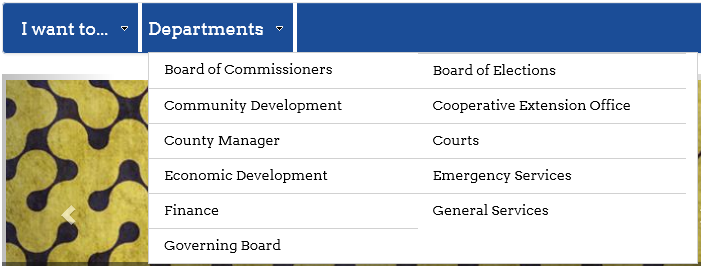
Let’s look at a normal presentation of the Global navigation menu. You can see if I have more than 10-12 items, I have to scroll the browser to see the full menu.
By simply using CSS to render the menu using multiple columns, we can now see the whole menu above the fold of the page.
Here’s the CSS to apply. You’ll need to put this in to an alternate CSS file or otherwise reference it through your custom master page.
/*two column nav dropdown - only in wide view*/
@media (min-width: 768px) {
  #topnavbar .nav li.static > ul.dynamic {
    text-align: left !important;
    width: 550px !important;
  }

  #topnavbar .nav li.static > ul.dynamic > li.dynamic {
    display: inline-block;
    list-style-type: none;
    float: left !important;
    width: 49% !important;
  }

  #topnavbar .nav li.static > ul.dynamic > li.dynamic:nth-child(odd) {
    clear: left !important;
  }
}
A few additional comments:
In this specific case, I am using Bootstrap, so that is why the .nav class indicator is included in the selector. It is also why I wrap this CSS block in a media query so that the multiple column display only is applied in the largest views of the page.
You’ll notice that it renders the menu items left to right, not down the first column, then up to the second column. This is simply an easier approach since we never know how many menu elements are present.
There are other Mega Menu approaches that incorporate images or multiple menu hierarchies. However, if you just needing to compress the menu above the fold, this is a pretty efficient method.
I love small business. They innovate. They drive our economy. They offer products in an agile manner.
I love cloud computing. It’s convenient. It’s flexible. It makes things affordable that once were cost prohibitive.
Doing business with anyone carries risk, and some may feel that doing business with small businesses carries greater risk. But we do it anyway because we like the product or service that is offered.
One such small business that I have done business with is CodeSpaces. They were a startup that provided cloud-hosted Source code control such as Subversion and Git. They had a continually improving project management dashboard oriented around agile methodologies. They were affordable, with plans as low as $2/month.
When I started HomeSpot HQ, I had a laptop. I did most of my development on that laptop, but knew I needed a place for source code control. Being familiar with Subversion, and being in need of a free or low cost solution, I researched and found CodeSpaces. Upon registering for an account, I pushed my source files in to the cloud, ready to access them anywhere.
CodeSpaces announced yesterday that their service had been breached by an unauthorized attacker, and that a good portion of the code, project information, and other customer data that had been willingly pushed to the cloud by their customers had been irreversibly destroyed.
CodeSpaces issued this statement about the incident:
Code Spaces will not be able to operate beyond this point, the cost of resolving this issue to date and the expected cost of refunding customers who have been left without the service they paid for will put Code Spaces in a irreversible position both financially and in terms of on going credibility.
As such at this point in time we have no alternative but to cease trading and concentrate on supporting our affected customers in exporting any remaining data they have left with us.
Thankfully for myself and for HomeSpot HQ, I had moved off of using CodeSpaces for my ongoing source control solution. But had I not, then not only was CodeSpaces’ business compromised, but quite possibly mine would have been as well.
I frequently receive emails from new HomeSpot HQ users that read something like this. “I really love your product and am excited to use it. However, what happens to my data if you disappear as a business? Is there a way to export or extract it?”
These users are rightfully being proactive in considering the safety and trustworthiness of the cloud. They recognize the value of the data they would provide, and the value of the time required to provide it. They want assurances that their effort will not be wasted because we close up shop overnight.
CodeSpaces is the victim of a crime. They indicate in their full statement that they have withstood previous attacks without incident. It is unfortunate that this crime leaves the company in a state where their only option is to close.
This story (and many like it) illustrate the risk we take when using hosted services. It forces me as the provider of such a service to redouble my efforts to keep my customer’s data secure. This is the world we live in.
Earlier this month, I wrote about how it’s inevitable that you’re going to be distracted during the course of your workday. Today I’m adding a second installation to the “You’re going to…” series by assuring you that You’re going to fall behind.
What I mean by this is that as a developer, there will always be things you can’t keep up on. Be that a new language, framework, toolkit, backlog of features, unit test coverage, or even documentation. There simply has become too much to learn, too much to consume, too much to monitor, for any normal person with a day job to manage. And that is okay.
Back in the day
When I started software development in the late 1990’s, there really were fewer options for how you did your work. It really came down to a few languages, and those mostly supported by Microsoft, namely FoxPro, Visual Basic, and C++. Even Java, released in 1995, was only beginning to garner some momentum. Consequently, there were finite choices, and seemingly finite amounts of reference material to consume. These are the days when not only would you get 25 3.5 inch floppy disks to install the product, you’d get 3 or 4 printed volumes as instructional guides. If you were lucky enough, as I was, to have an employer who would spring for the CD-ROM based MSDN library subscription, then your reference base grew a bit more, especially with each quarterly release.
But in the end, if I had a problem I couldn’t solve, the standard solution was at the other end of the Microsoft Support telephone number. I have many memories of sitting on hold waiting for a support representative to pick up so I could ask a single question.
The release cycles for new products in the late 90’s and early 2000’s were long. And the infancy of the Internet at that stage meant that only so many new products or technologies became available each year. I dare say it was manageable, and if you paid attention, you could reasonably stay current with the latest and greatest.
The Internet changed everything
In my view, the Internet has had two significant impacts on the field of software development. The first is the amount of content available related to any given programming language, or in fact any given specific issue. The second is the acceleration of new technology being released for developers to leverage.
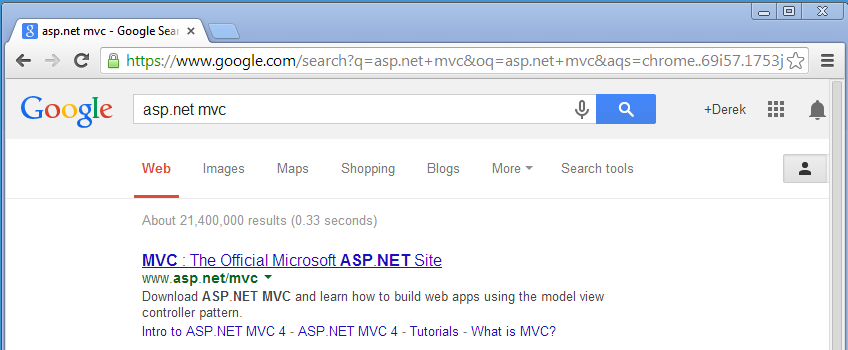
To illustrate the former point, do a simple Google search for your programming language of choice. The results may surprise you.
21 million results. 21 million pages that all may have something relevant to the problem you are trying to solve. It’s no wonder we feel overwhelmed.
How to keep up
Just as you would if you found yourself falling behind the pack in a footrace, keeping up with the industry requires that you dig deep in to your core and put all you have towards closing the gap. Here are some things I have found useful.
1. Plan to give a talk
One of the most effective ways I have found to embark on learning a new technology or method is to commit myself to giving a presentation about that topic. This can be at a user group, a code camp, or even just as a lunch-and-learn with your team. The risk of embarrassment in front of your peers is a giant motivator, and a deadline can help you prioritize and structure your learning.
2. Optimize your online consumption
With the glut of material out on the Internet, how possibly do you filter though the volume and get to the best resources. One method I use is to always start with what I call my trusted sources. These are individuals like Scott Hanselman, K. Scott Allen, and Randy Drisgill, who have an established reputation as reliable authors. The next tier is material from the producers of the technology themselves. Everything from Microsoft down to the discussion threads on CodePlex, if it’s directly tied to the people creating the technology, chances are you’ll get better quality information. Finally, expand to the general tech blogosphere. Every developer has their own application and experience with a language or tool, and that broad base will give you lots of insight as to what is good, bad, and ugly about the product.
3. Online video and Podcasts
In the last few years there has been a downright explosion of online video training materials available online. Free sites like DimeCasts; paid sites like WintellectNow and Pluralsight; and of course, lots of user-sourced material on YouTube. The genre of tech-focused online screencasts is maturing rapidly and gaining not just popularity, but quality. Similarly, chances are there are dozens of individual podcasts available oriented around the topic du jour. Online training and podcasts are great because they can be portable as well as passive. You can listen to a podcast while on the treadmill, or watch a video while traveling. These are great tools to help you incrementally grow in knowledge.
4. Start a side project
If you are like me, and I think most developers, you learn best by doing. So if your main job doesn’t afford you the opportunity to explore and apply new technology, create your own project that does. I started HomeSpotHQ.com in 2009, and it became the venue in which I learned MVC. Setting off to create a product, whether or not you make it public, is a great form of focused learning. If you’re particularly motivated, you can follow in Jennifer Dewalt’s footsteps and do 180 websites in 180 days, each implementing a specific method or tool. The point is to not just read and watch, but do.
Long journey, first steps
I think being a developer forces you to be a lifelong learner. There’s no other way to stay competitive and relevant in the marketplace. So when you find yourself worrying or frustrated because you learn about yet another JavaScript framework that released, remember that we’re all in the same boat. Pick up an oar, set a target, and get to work.
This month I’ve been trying to see if there is a measurable difference in regard to how much I get done when working at the office vs. working at home. For most of my career I’ve considered working out of the office the way to really get things done, as an escape from the distractions that come with being in a venue filled with people who want to interrupt you.
What I am finding, however, is that for every knock on the door interruption at the office, I seem to have just as many screaming child interruptions at home. Everywhere I go it seems, there are the actual and metaphorical squirrels intent on catching and keeping my attention.
https://www.flickr.com/photos/binaryape/
The point is, of course, not about location, as much as it is that you’re going to be distracted. Our work life is full of interruptions, be them email, instant messaging, phone calls, knocks on the door, reloading cups of coffee, going to the bathroom, lunch, retrieving something from the printer, daily standups….you get the idea. At home, these things all basically exist just the same, and are augmented by children, laundry, the UPS guy, the neighbor’s lawn service, going to the school bus, and dozens of other things.
But wait! Maybe working at the coffee shop will be better? Nope, there you have the hiss of the espresso machine, the constant coming and going of people, and worse, other people’s children!
So how do we get things done? How as a developer can I possibly have a block of uninterrupted time suitable to starting and finishing a task?
Learn the time of day that works best for you, and do your best work in it
One year while I was in college, a class scheduling conflict required me to put in hours at my internship between 6:00am and 10:00am several days a week, returning to campus for lunch and classes in the afternoon. I found during that time that I worked well, and by that I mean I had strong focus, during the early morning hours. That time slot is much harder to come by these days as there are lunches to be made and kids to feed, but occasionally I’ll find myself awake early and able to preempt the day with some productive hours. For others, it may be mid afternoon when they find their best focus, when the crises of the new day are dealt with. Still others stay up late. Whatever your preference, by organizing the most important tasks around the time when you do the best work, more may be achieved.
Operate on clear deliverables
When I clearly know the particular task at hand, and it is a self contained unit of work, I find my ability to focus and complete that task without being derailed by distractions is much stronger. Whether it is a bug ticket, a specific item to research, or a new feature, having a tangible, manageable task to complete makes it easier to return to the task after an interruption occurs.
Shut down your browser
In my normal Chrome instance, I have 3 tabs of email inboxes, Twitter, Drudge Report, and Hacker News. That’s six distractions that I invited in to my day. In any idle moment, be it the recompile of a project, or the start up of a new virtual machine, my default action is to touch all six of those tabs looking for changes. F5 is the enemy! As hard as it is, working in a vacuum sometimes is the best way to narrowly focus on a task.
As I age I’m learning that focus is a skill, and one that must be practiced and honed. What are your methods for staying focused and getting things done?
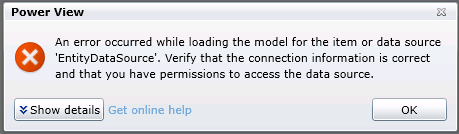
So I’ve got a PowerView report hosted in SharePoint. And it throws up the following when I try to load it:
The full error details are:
<detail><ErrorCode xmlns="https://www.microsoft.com/sql/reportingservices">rsCannotRetrieveModel</ErrorCode><HttpStatus xmlns="https://www.microsoft.com/sql/reportingservices">400</HttpStatus><Message xmlns="https://www.microsoft.com/sql/reportingservices">An error occurred while loading the model for the item or data source 'EntityDataSource'. Verify that the connection information is correct and that you have permissions to access the data source.</Message><HelpLink xmlns="https://www.microsoft.com/sql/reportingservices">https://go.microsoft.com/fwlink/?LinkId=20476&EvtSrc=Microsoft.ReportingServices.Diagnostics.Utilities.ErrorStrings&EvtID=rsCannotRetrieveModel&ProdName=Microsoft%20SQL%20Server%20Reporting%20Services&ProdVer=11.0.3128.0</HelpLink><ProductName xmlns="https://www.microsoft.com/sql/reportingservices">Microsoft SQL Server Reporting Services</ProductName><ProductVersion xmlns="https://www.microsoft.com/sql/reportingservices">11.0.3128.0</ProductVersion><ProductLocaleId xmlns="https://www.microsoft.com/sql/reportingservices">127</ProductLocaleId><OperatingSystem xmlns="https://www.microsoft.com/sql/reportingservices">OsIndependent</OperatingSystem><CountryLocaleId xmlns="https://www.microsoft.com/sql/reportingservices">1033</CountryLocaleId><MoreInformation xmlns="https://www.microsoft.com/sql/reportingservices"><Source>ReportingServicesLibrary</Source><Message msrs:ErrorCode="rsCannotRetrieveModel" msrs:HelpLink="https://go.microsoft.com/fwlink/?LinkId=20476&EvtSrc=Microsoft.ReportingServices.Diagnostics.Utilities.ErrorStrings&EvtID=rsCannotRetrieveModel&ProdName=Microsoft%20SQL%20Server%20Reporting%20Services&ProdVer=11.0.3128.0" xmlns:msrs="https://www.microsoft.com/sql/reportingservices">An error occurred while loading the model for the item or data source 'EntityDataSource'. Verify that the connection information is correct and that you have permissions to access the data source.</Message><MoreInformation><Source>Microsoft.ReportingServices.ProcessingCore</Source><Message msrs:ErrorCode="rsErrorOpeningConnection" msrs:HelpLink="https://go.microsoft.com/fwlink/?LinkId=20476&EvtSrc=Microsoft.ReportingServices.Diagnostics.Utilities.ErrorStrings&EvtID=rsErrorOpeningConnection&ProdName=Microsoft%20SQL%20Server%20Reporting%20Services&ProdVer=11.0.3128.0" xmlns:msrs="https://www.microsoft.com/sql/reportingservices">Cannot create a connection to data source 'EntityDataSource'.</Message><MoreInformation><Source>Microsoft.AnalysisServices.AdomdClient</Source><Message>Authentication failed.</Message><MoreInformation><Source>Microsoft.AnalysisServices.AdomdClient</Source><Message>No credentials are available in the security package</Message></MoreInformation></MoreInformation></MoreInformation></MoreInformation><Warnings xmlns="https://www.microsoft.com/sql/reportingservices" /></detail>
And so begins the journey of trying to uncover just which set of credentials isn’t in the right place. Let’s stop and look at the flow that occurs when you try to load that report:
PowerView Report hands off to BI Semantic Model (also hosted on SharePoint on the WFE server, running under an application pool)
BI Semantic Model points to SQL Server Analysis Server Instance on your SQL Server.
Credential check occurs on SSAS Instance to determine if adequate permissions exist for requesting user. If so, query runs, data sent back, and report displays. If not, we get an error like the one above.
Like many things in SharePoint, this transaction can be governed by Kerberos, which facilitates the passing of credentials from one server or service to another. It’s easy to confirm if this is a Kerberos issue by changing our report to use a specific username and password.
In the PowerView gallery, change to the All Documents view, then drop down the menu for your specific report and select Manage Data Sources.
In my case, the entry for EntityDataSource is shown. Click on that to get the details.
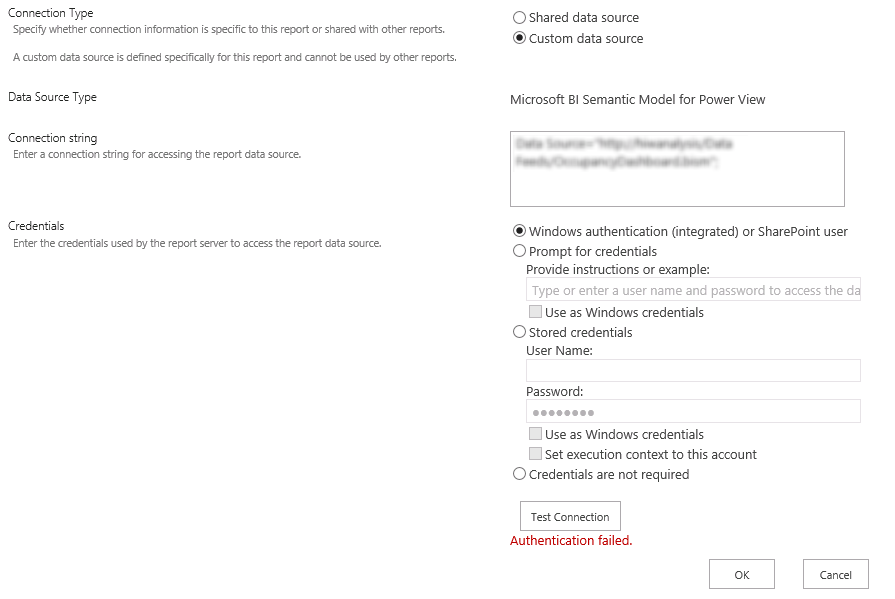
Here’s what happens when we use the Windows authentication (integrated) or SharePoint user option and click Test Connection. No worky.
Here’s what happens when we put in specific credentials and click Test Connection.
So while the symptoms and appears would point to a Kerberos configuration issue, in truth, the solution (in my case) lies with the Claims to Windows Token Service.
By default, this service is provisioned to run as Local System. But there is guidance to run this as a domain account. However, in doing so, additional local security policy changes must be made on the server on which the service is running, in this case, the SQL server.
The domain account used by the Claims to Windows Token Service needs to be granted the following rights through the Local Security Policy:
1. Act as part of the operating system
2. Impersonate a client after authentication
3. Log on as a service
You can find these settings under Administrative Tools > Local Security Policy > Local Policies > User Rights Assignment.
No reboot is necessary for these changes to take effect. As soon as I returned to my PowerView report and refreshed, the report loaded without error.
Hat tip to this thread for pointing me in the right direction.
Ah, the close of a year and start of another. A time to reflect and plan, and pick out those things that you hope to do in the coming trip around the sun.
In truth, very few people orient their lives around goals. But there is great power in naming, documenting, and planning out what you hope to achieve.
And so, the following 4 items are the things I hope to achieve in 2014.
Write 4 or more blog posts per quarter.
Create 3 or more training courses for WintellectNow.
Give 2 or more talks at user groups and Code Camp
Start 1 podcast.
Action
If writing down goals were enough, we’d no doubt all be highly successful professionals. But action is required. I find that in order to be effective at moving towards my goals, I have to form a specific action plan that breaks out the endgame in to a series of measurable steps. Think of it like wanting to save $1,000. Will you be more successful if you set up an automatic draft that pulls $83.33 a month in to your savings account, or if you try to cram $1,000 worth of margin in to December’s budget? Here are some tips I use when creating action plans.
Look for equally sized units of effort
Just as in our savings example above, if you can break you goal in to equally sized steps, you may find them easier to achieve over and over, since after the first few times you’ll know what to expect.
Use your calendar
As a husband and parent, I have a finite amount of free time to work on extra-curricular professional development and hobbies. Add to the mix other activities like Netflix or hanging out with the guys, and the ability to routinely make progress can be easily thwarted. One method that my wife and I have adopted is to plan out the week ahead and agree on what nights we’ll watch TV, which nights will be used for individual projects, and what nights we have plans with others. This way, I know in advance when my working hours will occur, and I can prepare accordingly. Also, it helps avoid spousal neglect syndrome since we’ve pre-planned when we’ll each do our own thing.
Chart and share your progress
Studies have shown that sharing your progress and results with others can have a significant impact on the success of reaching your goals. As part of your action plan, identify the key items that can be reported out to a spouse, colleague, or friend. Invite them to hold you accountable to achieving your goals, and that inner pressure to impress will drive you towards results.
Goals are more than quick wins. They are the path to personal growth. So, raise a glass tonight to toast in the new year, but start tomorrow with a plan.
A few weeks ago I took my six year old daughter to a Scratch workshop at our local public library. I had heard about Scratch, but had not really seen it in action, and was very curious to see how my kid would take to it.
The workshop leader gave a very brief intro to the platform and did a simple sample program to get us started. He also had printed out the learning cards from the Scratch website, which give various samples and the specific code blocks to use to complete them.
By the end of the hour, we had implemented and adapted the program from one of the tutorials to make a picture of a cat chase a picture of a fish, and play a ‘meow’ sound whenever it ‘caught’ it. My daughter had a lot of fun, and now has added ‘can I play Scratch’ to her list of tech related requests, after 1. Can I watch a movie? and 2. Can I play on the iPad?
For those who may not be familiar with it, Scratch is a project from the MIT media lab. There is a great TED talk about its origins. The user interface is at the same time kid friendly and sophisticated.
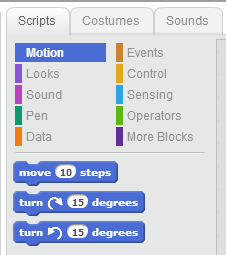
Programming in Scratch involves selecting a sprite and assembling a list of commands by dragging-and-dropping them on to a program canvas. The commands are color coded, and snap together Lego-style. You can have multiple sprites, and all the basic programming constructs are there, including conditions, loops, variables, events, and properties.
While Scratch is one of a growing number of platforms intended to introduce children to programming, it makes me wonder if it is the future of programming. Given that a whole generation of kids may grow up using Scratch, and consequently think that programming is a drag-and-drop, snap-together experience, I wonder if they will be disappointed to know that in real life, programming is a lot of typing.
I have a lot of respect and admiration of Andrew Hunt and David Thomas, authors of The Pragmatic Programmer. One of their tips is simply “Write Code That Writes Code”. They liken code-generators to templates and jigs used by woodworkers to use for repeated tasks. In some regard, Scratch is a code generator, in fact, quite a dynamic one. The click-together code blocks abstract out the core usage into a simple UI based entity, suitable for even a 6 year old to comprehend.
As a professional developer, I have always had a love-hate relationship with code generation tools. Part of me is a purist, wanting to write and own my own code, line by line. Part of me sees the HTML generated by Microsoft Word and wants to throw up. I have always held that writing code and gaining the experience and understanding of what is really going on is more valuable than just getting something generated quickly. But would I be happier to be able to quit typing line after line and instead drag-and-drop blocks on to the canvas? Would I feel in control enough of the output to appreciate the simplicity and convenience that the canvas offers?
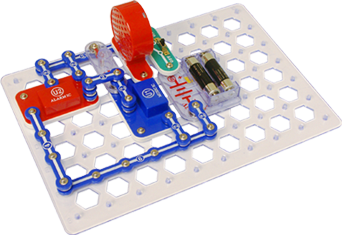
A more tangible analog to Scratch in the physical world are SnapCircuits. This ingenious kit allows kids to design and assemble electronic circuits and systems using snap-together components that conduct electricity through the contact points. There are switches, batteries, lights, bells, capacitors, and resistors. Using a underlying grid, you simply assemble the circuit by placing and connecting the individual parts. All the realities of electronics are there, just in a kid-friendly mode. Ohm’s law holds true for SnapCircuits just as it would any other electrical system.
But would you wire a house using SnapCircuits? Would we want to, given the chance? Wrapping wires around screws has worked for decades, right? Are these ‘snap-together’ systems only suitable for children?
If a system or new code-writing methodology would let me as a developer build systems faster, then there certainly is value to that. But are we too ‘mature’ to consider ‘kid-friendly’ methods as the way to achieve those gains? Perhaps my daughter’s generation will demand that shift, and they’ll have the bright minds at MIT who created Scratch to thank for it.
Recently, a fair amount of media attention has been directed at the idea of standing instead of sitting while one works. There are reports showing that sitting kills, and a variety of options for adjustable tables or desktop stands have hit the market.
As a developer who does in fact, work at a desk for the better part of 8 hours a day, I can attest that working while standing does allow me to feel more alert and focused while I work.
So I set off to design and build a sit-or-stand platform for my home office.
Since the file cabinet and desktop setup I constructed for my home office is shared between my wife and I, a free standing desk wasn’t an option. Rather, I needed something that could sit on top of my existing desk, but rise up to standing height when I preferred to work while standing. Since I have both a laptop and additional monitors, a product like the the Furinno laptop stand wasn’t viable, due to its size.
Furinno laptop stand
The next step up is to products like the Kangaroo from Ergotron or the Workfit S by Ergotron. These run between $300 and $600. There are models to support single or dual monitors, or laptop plus monitor in the case of the Kangaroo (shown below). However, the cost of these products was too high for me to justify, and their cubicle style appearance just wasn’t going to have a high enough Wife Acceptance Factor.
Kangaroo Hybrid by Ergo DesktopWorkfit-S by Ergotron
The next option that I found was the Varidesk. It is a freestanding unit that sits on the desktop, with a simple adjustable rise of about 15 inches. But at $300 it was still beyond my budget. Still, the Varidesk inspired my design in its simplicity and mechanics.
Design Criteria
Have a maximum footprint of less than 23 inches (the depth of my desktop)
Have a rise of approximately 12 inches, which would put the platform at about 42 inches in standing mode.
Allow enough space on the desktop to just open the laptop for quick usage.
Avoid permanently attaching or drilling in to the desktop.
Utilize as much scrap lumber and various hardware in the garage as possible.
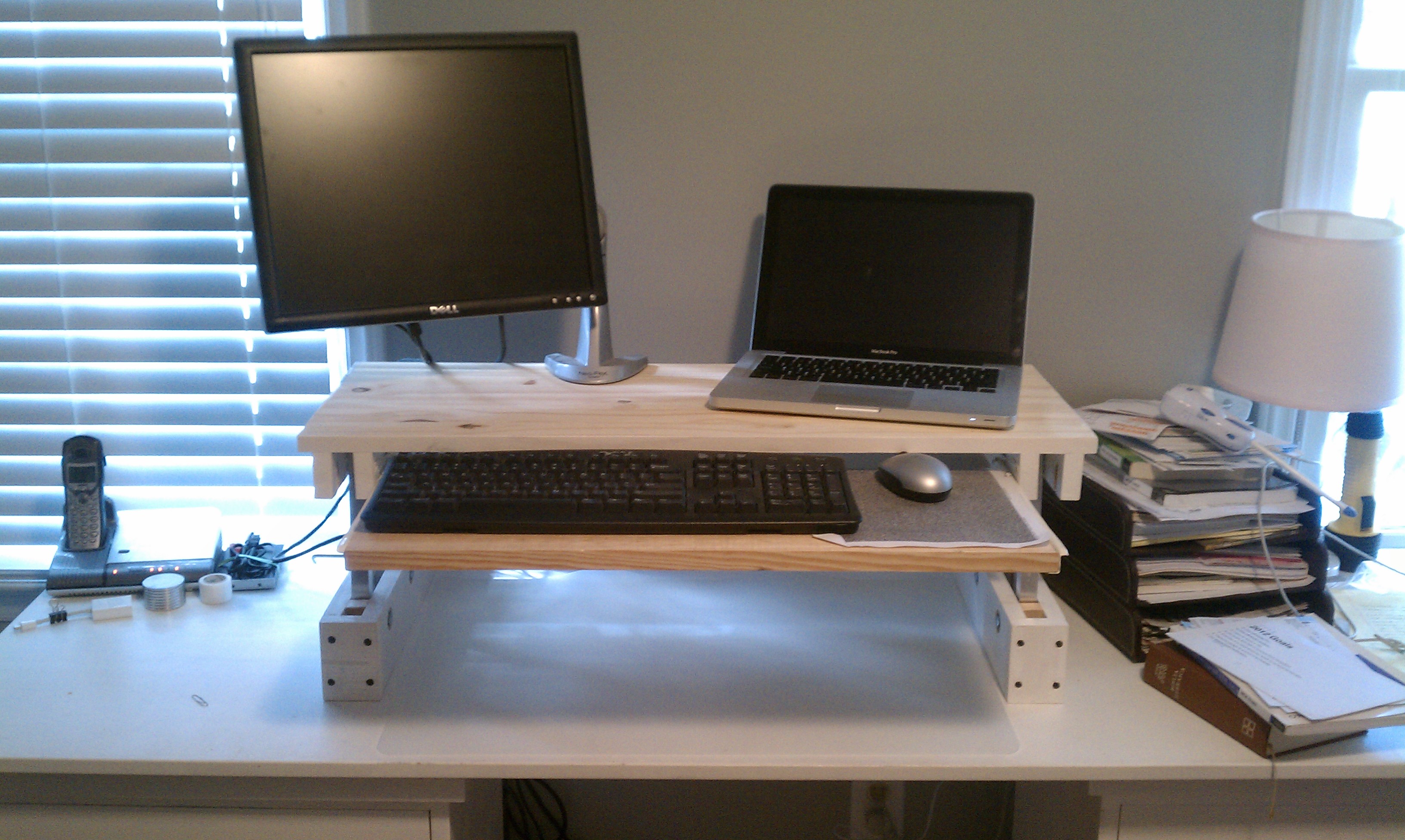
My design would consist of a simple base, a primary platform for my monitor and laptop, with a slide out keyboard tray. I had decent lengths of 1×12 and 1×10 left over from my last project, so I chose them to be the platform and tray. For the base, I would use 1×4 stock, and rip down 1×2 lengths for the supports under the platform.
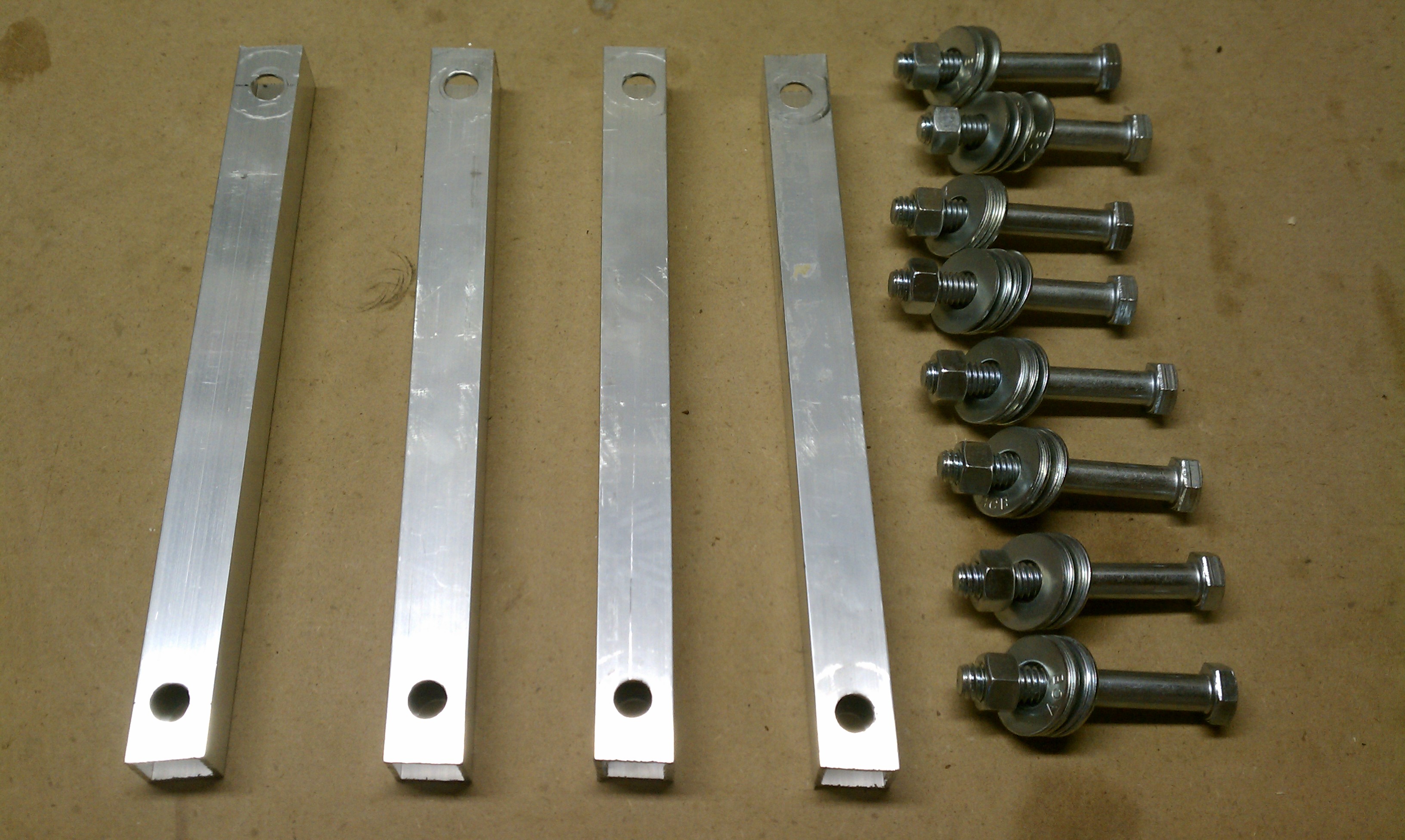
My primary concern was for strength and stability, so I chose to purchase a 3/4″ x 3/4″ square aluminum tube for my supports. This one item was about $12 for a 4 foot length, and represented the bulk of the project’s cost. Steel tube would have been less expensive, and 3/4″ electrical conduit, while round not square, would have been the least expensive option. I preferred the aluminum finish overall and decided to splurge.
For hardware, I used 3/8″ diameter bolts that were 2 1/2″ long. I ended up getting ones that were partially threaded, which turned out to be perfect so the supports aren’t rotating along the threads.
I needed 8 bolts, 8 nuts, and 32 washers. The cost of this hardware was about $10.
I found 12″ deep drawer slides in my garage from a previous project, but if I had to purchase these, they would be $4 or $5.
Construction
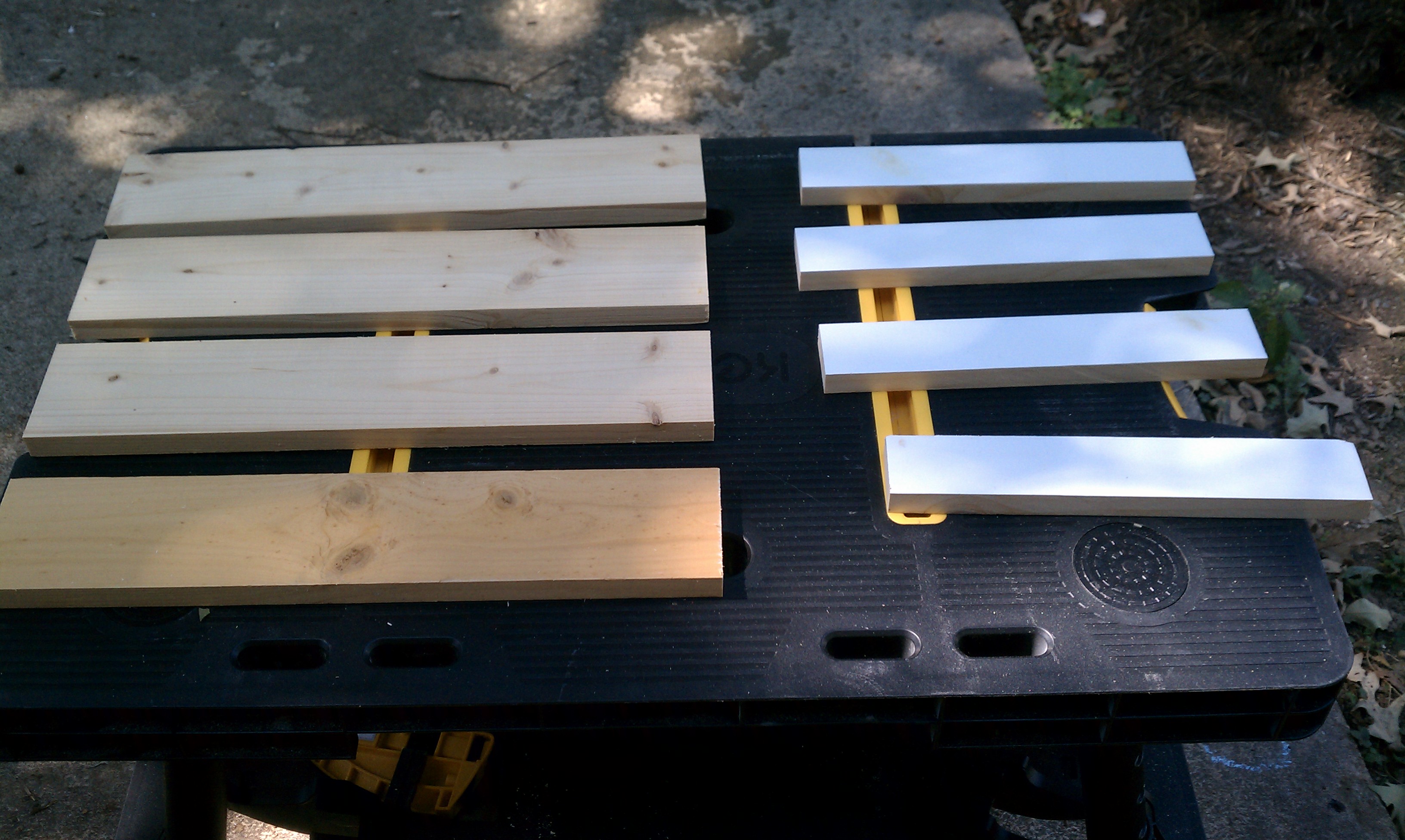
After cutting the 1×4 to 18″ lengths for the base, I then ripped down another plank to a true 2″ width. I cut four pieces at 11 7/8″ to go under the platform.
Geometry proved to be the biggest challenge of this project. I knew I wanted the platform to be flush along the back edge, and rotate up to be flush along the front edge, only 12 inches higher.
I first attempted to model this in Google Sketchup, which proved to be a big time sink. While it’s easy to model the boards, getting the rotation arc was hard to do (for me at least).
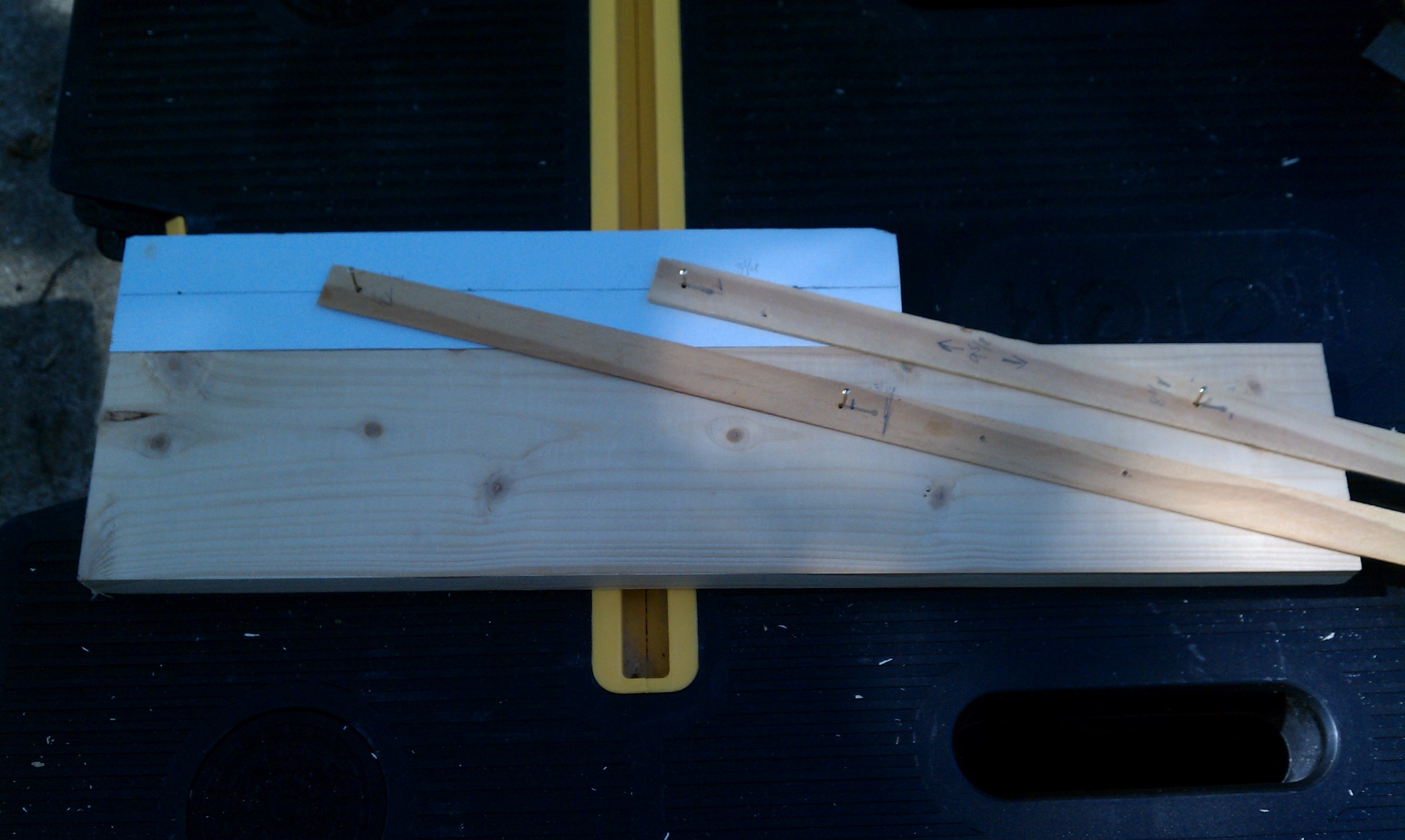
With my actual pieces in place, I decided to just try to mock it up with some thin strips of wood and tacks. My goal was to get the proper length of the vertical supports, and the proper offset for the pivot points in both the base and upper supports. Here’s a picture of my prototype:
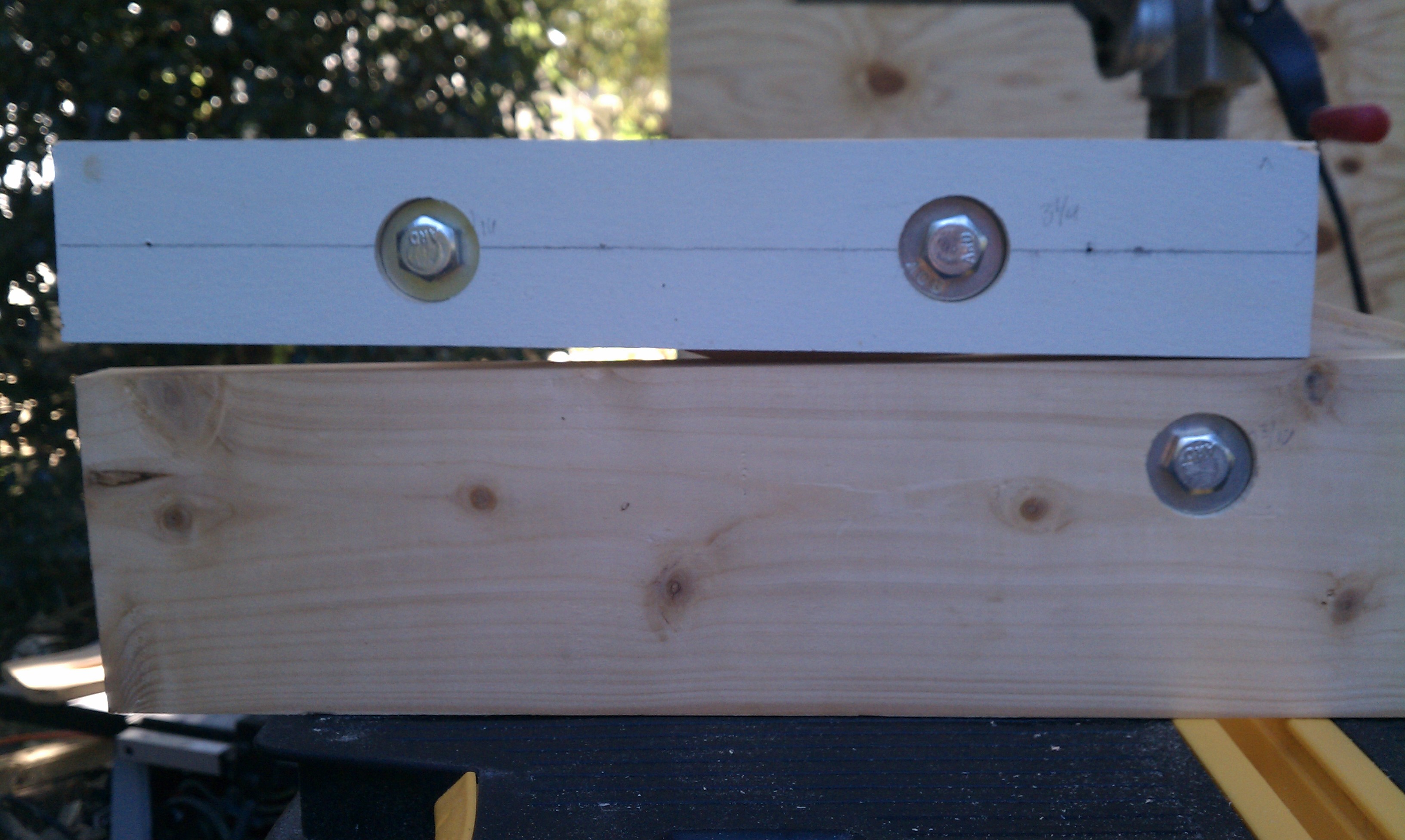
After getting what I thought were suitable points, I needed to drill the holes for the bolts and countersinks for the washers. Using a drill press, I first did a 1″ for the countersink about 1/4″ deep. Then I flipped the piece over and did a 3/8″ hole from the other side (to prevent tear-out). I did this for all 8 pieces.
CAUTION: You’ll have to make sure to pair the pieces together and measure from the left on one and the right on the other so the holes match up.
Before committing to cut the aluminum tube, I first used 3/4 x 3/4 wood rods to make sure I got all my measurements correct. It’s a good thing I did, because in fact, I had miscalculated ever so slightly the placement of one of the holes. Consequently, my rotation was off, resulting in the platform not laying flat against the base.
In re-evaluating the measurements, it became clear that I needed both sets of holes to be the same distance apart. There is a form where by the spacing can be narrower on one side, provided that one diameter is longer than the other (a car jack has this arrangement.) But in my case, equal spacing was the trick to keep the vertical supports parallel all along their rotation. On the 2nd pass, the alignment came out much cleaner.
I then cut the aluminum rod using a hacksaw, and carefully drilled 3/8″ holes in each end.
My total width of the platform would be 32″, and the keyboard tray would be 25″. I cut these to length, then used a Kreg pocket hole jig to drill through the upper supports in order to mount them to the platform. Again, I paired the supports so all the pocket holes would be concealed.
Finally, I put a back support across the base to add stability and rigidity, and caps on the front for a clean look.
Stop Blocks and Pins
In order to prevent the platform from rotating all the way forward, I put stop blocks in the base at its maximum height.
To lock the platform in place, I found some surplus Allen keys from some piece of IKEA furniture we’d assembled. I drilled a hole through the base behind each of the rear supports, so that I can insert the pin to hold it in place. (If you wanted to have multiple height settings, you could have several pin locations along the rotation.)
Finally I installed the drawer slides and attached the keyboard tray, and gave the entire unit a coat of paint.
Do you like this design but aren’t interested in building your own? I’m taking orders for pre-made Standing Desks that I’ll build and ship to you. Check out www.freestander.us to learn more and place an order.
Installation
In order to prevent the unit from sliding when I would lift up the platform, I attached two adjustable L-brackets to the base so I could ‘hook’ the unit to the desktop and clamp it down. I used wing-nuts to make it easier to secure when near the wall.
My monitor mount attached nicely to the platform, and gives me plenty of room for either my 13″ Macbook Pro, or 15″ HP laptops. I also added some cable retainers to keep various cables close at hand.
Standing positionSitting position
This project took me two weekends, one for construction and one for painting, but I am totally pleased with the result. I may end up building a second one for my office at work.
UPDATE: Many people have asked for a video showing the operation of the desk, so I have put that together below.