Tag: sql

  • Action 4.0.98.0 of Microsoft.SharePoint.Upgrade.SPContentDatabaseSequence failed.

    While attempting to perform a SharePoint 2007 to SharePoint 2010 upgrade using the Database Attach Method this weekend, I ran into an error I hadn’t seen before:

    Action 4.0.98.0 of Microsoft.SharePoint.Upgrade.SPContentDatabaseSequence failed.
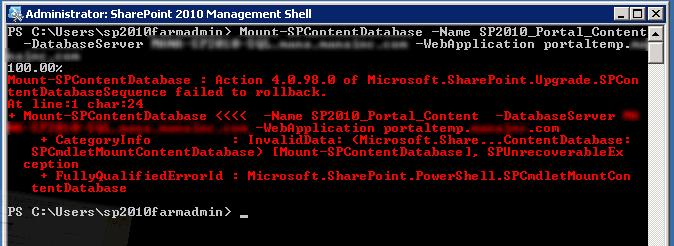
    Looking in to the Upgrade Error log file, I found the culprit:

    [powershell][/powershell][SPContentDatabaseSequence] [ERROR] [9/30/2012 1:03:13 PM]: Exception: The transaction log for database ‘SP2010_2007Portal_Content’ is full. To find out why space in the log cannot be reused, see the log_reuse_wait_desc column in sys.databases

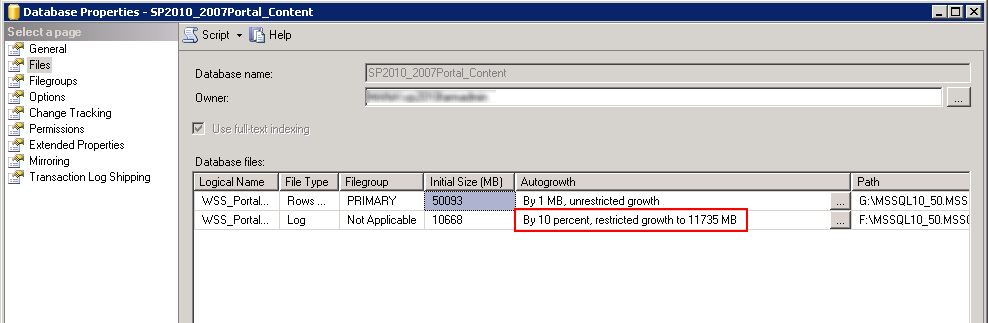
    It turns out that the database I had restored had a Maximum Size setting for the transaction log.  The Property pages for the Database revealed this fact:
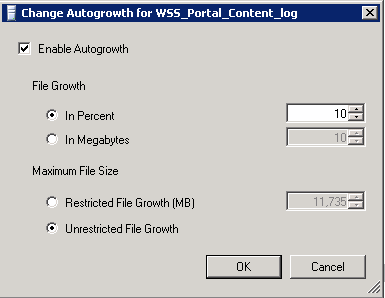
    I went ahead and changed the autogrowth settings to allow unrestricted growth.
    I then retried the Upgrade/Mount of the database and it went through without any errors.
  • SSMS Tools Pack Works for Me

    Today a co-worker of mine introduced me to a great add on to Microsoft’s SQL Server Management Studio (SSMS).  It’s simply called the SSMS Tools Pack and is a free download from https://www.ssmstoolspack.com/

    The product is a collection of ‘a few upgrades to the SSMS IDE that I thought were missing” according to the author.  These features include:

    • SQL Snippets
    • Window Connection Coloring
    • Window Content History, Query Execution History and Current Window History
    • Format SQL
    • Search Table, View or Database Data
    • Run one script on multiple databases
    • Copy execution plan bitmaps to clipboard or file
    • Search Results in Grid Mode
    • Generate Insert statements from resultsets, tables or databases
    • Regions and Debug sections
    • Running custom scripts from Object Explorer
    • CRUD (Create, Read, Update, Delete) stored procedure generation
    • New query template
    • General Options

    The particular feature I needed was to Generate Insert statements from an existing table – particularly when dealing with partial synchronizing between two copies of the same database, such as a Dev and Staging or Production environment.

    I’ve added SSMS Tools Pack to all of my systems now, and is definitely one product I want to promote.