Tag: claims authentication

  • PowerView report fails –  No credentials are available in the security package

    PowerView report fails – No credentials are available in the security package

    So I’ve got a PowerView report hosted in SharePoint.  And it throws up the following when I try to load it:
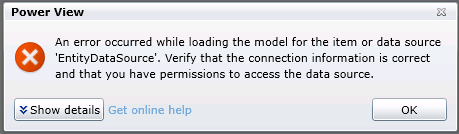
    PowerView Auth fail

    The full error details are:

    <detail><ErrorCode xmlns="https://www.microsoft.com/sql/reportingservices">rsCannotRetrieveModel</ErrorCode><HttpStatus xmlns="https://www.microsoft.com/sql/reportingservices">400</HttpStatus><Message xmlns="https://www.microsoft.com/sql/reportingservices">An error occurred while loading the model for the item or data source 'EntityDataSource'. Verify that the connection information is correct and that you have permissions to access the data source.</Message><HelpLink xmlns="https://www.microsoft.com/sql/reportingservices">https://go.microsoft.com/fwlink/?LinkId=20476&amp;EvtSrc=Microsoft.ReportingServices.Diagnostics.Utilities.ErrorStrings&amp;EvtID=rsCannotRetrieveModel&amp;ProdName=Microsoft%20SQL%20Server%20Reporting%20Services&amp;ProdVer=11.0.3128.0</HelpLink><ProductName xmlns="https://www.microsoft.com/sql/reportingservices">Microsoft SQL Server Reporting Services</ProductName><ProductVersion xmlns="https://www.microsoft.com/sql/reportingservices">11.0.3128.0</ProductVersion><ProductLocaleId xmlns="https://www.microsoft.com/sql/reportingservices">127</ProductLocaleId><OperatingSystem xmlns="https://www.microsoft.com/sql/reportingservices">OsIndependent</OperatingSystem><CountryLocaleId xmlns="https://www.microsoft.com/sql/reportingservices">1033</CountryLocaleId><MoreInformation xmlns="https://www.microsoft.com/sql/reportingservices"><Source>ReportingServicesLibrary</Source><Message msrs:ErrorCode="rsCannotRetrieveModel" msrs:HelpLink="https://go.microsoft.com/fwlink/?LinkId=20476&amp;EvtSrc=Microsoft.ReportingServices.Diagnostics.Utilities.ErrorStrings&amp;EvtID=rsCannotRetrieveModel&amp;ProdName=Microsoft%20SQL%20Server%20Reporting%20Services&amp;ProdVer=11.0.3128.0" xmlns:msrs="https://www.microsoft.com/sql/reportingservices">An error occurred while loading the model for the item or data source 'EntityDataSource'. Verify that the connection information is correct and that you have permissions to access the data source.</Message><MoreInformation><Source>Microsoft.ReportingServices.ProcessingCore</Source><Message msrs:ErrorCode="rsErrorOpeningConnection" msrs:HelpLink="https://go.microsoft.com/fwlink/?LinkId=20476&amp;EvtSrc=Microsoft.ReportingServices.Diagnostics.Utilities.ErrorStrings&amp;EvtID=rsErrorOpeningConnection&amp;ProdName=Microsoft%20SQL%20Server%20Reporting%20Services&amp;ProdVer=11.0.3128.0" xmlns:msrs="https://www.microsoft.com/sql/reportingservices">Cannot create a connection to data source 'EntityDataSource'.</Message><MoreInformation><Source>Microsoft.AnalysisServices.AdomdClient</Source><Message>Authentication failed.</Message><MoreInformation><Source>Microsoft.AnalysisServices.AdomdClient</Source><Message>No credentials are available in the security package</Message></MoreInformation></MoreInformation></MoreInformation></MoreInformation><Warnings xmlns="https://www.microsoft.com/sql/reportingservices" /></detail>

    And so begins the journey of trying to uncover just which set of credentials isn’t in the right place.  Let’s stop and look at the flow that occurs when you try to load that report:

    PowerView Report hands off to BI Semantic Model (also hosted on SharePoint on the WFE server, running under an application pool)

    BI Semantic Model points to SQL Server Analysis Server Instance on your SQL Server.

    Credential check occurs on SSAS Instance to determine if adequate permissions exist for requesting user.  If so, query runs, data sent back, and report displays.  If not, we get an error like the one above.

    Like many things in SharePoint, this transaction can be governed by Kerberos, which facilitates the passing of credentials from one server or service to another.  It’s easy to confirm if this is a Kerberos issue by changing our report to use a specific username and password.

    In the PowerView gallery, change to the All Documents view, then drop down the menu for your specific report and select Manage Data Sources.

    In my case, the entry for EntityDataSource is shown.  Click on that to get the details.

    Here’s what happens when we use the Windows authentication (integrated) or SharePoint user option and click Test Connection.  No worky.
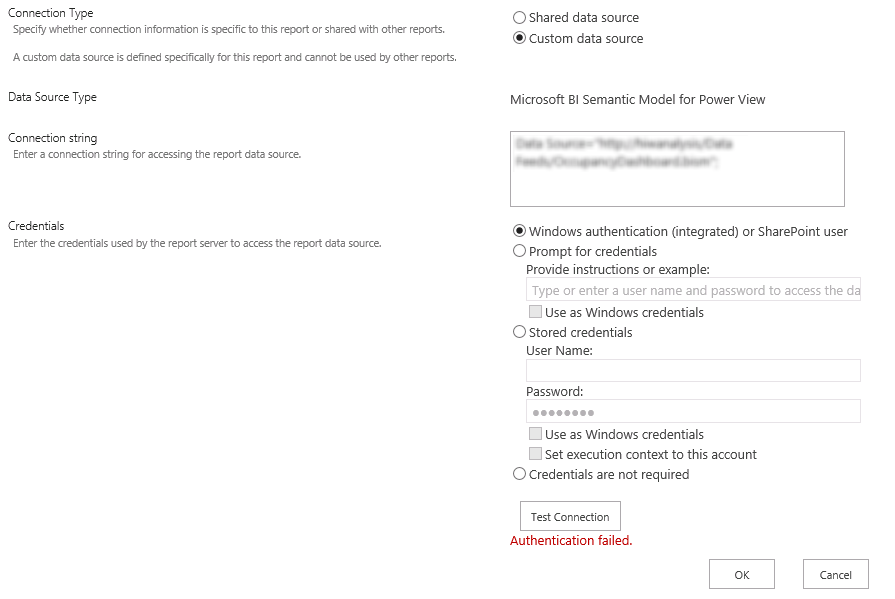
    pass-through-fail

    Here’s what happens when we put in specific credentials and click Test Connection.

    named-user-success

    So while the symptoms and appears would point to a Kerberos configuration issue, in truth, the solution (in my case) lies with the Claims to Windows Token Service.

    By default, this service is provisioned to run as Local System.  But there is guidance to run this as a domain account.  However, in doing so, additional local security policy changes must be made on the server on which the service is running, in this case, the SQL server.

    The domain account used by the Claims to Windows Token Service needs to be granted the following rights through the Local Security Policy:

    1. Act as part of the operating system

    2. Impersonate a client after authentication

    3. Log on as a service

    You can find these settings under Administrative Tools > Local Security Policy > Local Policies > User Rights Assignment.

    No reboot is necessary for these changes to take effect.  As soon as I returned to my PowerView report and refreshed, the report loaded without error.

    Hat tip to this thread for pointing me in the right direction.

  • Migration for site failed: Object reference not set to an instance of an object.

    Converting a SharePoint 2010 web application from Classic mode authentication to Claims Mode authentication is fairly well documented.

    After enabling claims mode, it is necessary to use the MigrateUsers() method to reformat the permissions entries in the Content Databases to reflect the Claims mode format.

    I have done several such conversions before without error, but this past weekend I tried another one for a client and ran in to an unusual error.

    The Web Application contained 3 content databases, and 4 site collections.

    The MigrateUsers call appeared to run successfully, and it reported no errors to the Powershell session.

    As we were testing access to the site collections, however, it became clear that one of the site collections had not been converted.

    In reviewing the ULS logs, the following entry revealed that an error had occurred during the run of the MigrateUsers method:

    Migration for site <null> failed: Object reference not set to an instance of an object.
    at
    at Microsoft.SharePoint.Administration.SPWebApplication.LogMigrationError(String name, String objectType, Exception e)
    at Microsoft.SharePoint.Administration.SPWebApplication.MigrateDatabaseHelper(SPContentDatabase database, SPCommonMigrateUserParameters commonParams, Dictionary`2 processedOldLogins)
    at Microsoft.SharePoint.Administration.SPWebApplication.MigrateUsers(IMigrateUserCallback callback)
    at MigrateUsers(Object , Object[] )
    at System.Management.Automation.DotNetAdapter.AuxiliaryMethodInvoke(Object target, Object[] arguments, MethodInformation methodInformation, Object[] originalArguments)
    at System.Management.Automation.DotNetAdapter.MethodInvokeDotNet(String methodName, Object target, MethodInformation[] methodInformation, Object[] arguments)
    at System.Management.Automation.Adapter.BaseMethodInvoke(PSMethod method, Object[] arguments)
    at System.Management.Automation.ParserOps.CallMethod(Token token, Object target, String methodName, Object[] paramArray, Boolean callStatic, Object valueToSet)
    at System.Management.Automation.MethodCallNode.InvokeMethod(Object target, Object[] arguments, Object value)
    at System.Management.Automation.MethodCallNode.Execute(Array input, Pipe outputPipe, ExecutionContext context)
    at System.Management.Automation.ParseTreeNode.Execute(Array input, Pipe outputPipe, ArrayList& resultList, ExecutionContext context)
    at System.Management.Automation.StatementListNode.ExecuteStatement(ParseTreeNode statement, Array input, Pipe outputPipe, ArrayList& resultList, ExecutionContext context)
    at System.Management.Automation.StatementListNode.Execute(Array input, Pipe outputPipe, ArrayList& resultList, ExecutionContext context)
    at System.Management.Automation.ParseTreeNode.Execute(Array input, Pipe outputPipe, ExecutionContext context)
    at System.Management.Automation.ScriptCommandProcessor.ExecuteWithCatch(ParseTreeNode ptn, Array inputToProcess)
    at System.Management.Automation.ScriptCommandProcessor.RunClause(ParseTreeNode clause, Object dollarUnderbar, Object inputToProcess)
    at System.Management.Automation.CommandProcessorBase.DoComplete()
    at System.Management.Automation.Internal.PipelineProcessor.SynchronousExecuteEnumerate(Object input, Hashtable errorResults, Boolean enumerate)
    at System.Management.Automation.Runspaces.LocalPipeline.InvokeHelper()
    at System.Management.Automation.Runspaces.LocalPipeline.InvokeThreadProc()
    at System.Management.Automation.Runspaces.PipelineThread.WorkerProc()
    at System.Threading.ExecutionContext.Run(ExecutionContext executionContext, ContextCallback callback, Object state)
    at System.Threading.ThreadHelper.ThreadStart()

    I’ll trim out the awful details of sitting on the phone with Microsoft technical support, and jump right to the fix.

    It turned out that when this SharePoint farm was upgraded from 2007 to 2010, there was a residual site collection in one of the content database.  Further, it so happened that this site collection had the same name and url as a sub site in another site collection.

    It appeared that as the MigrateUsers method was iterating through the site collections, it would follow the url to open the site collection and retrieve the users in order to convert them.  In this case, however, the url led not to a site collection, but a sub site, and thus the ‘Object reference not set to an instance of an object.’ error occurred.

    After confirming that the residual site collection was unused and contained no content, I (nervously) deleted it in Central Administration.

    I then re-ran the MigrateUsers() method, and it successfully converted the users for all site collections, and users were able to authenticate properly to the sites.

    I recognize this is an unusual situation due to the particular data in this installation.  But having found very little information about any such case, I wanted to share my experience.