Blog

  • Fun with Guids – SharePoint 2010 edition

    While working this week on a SharePoint 2010 installation,  I noticed the following entries in the web.config file.  Kind of a Guid easter egg.

    <Action id="0ff1ce14-0001-0002-0000-000000000000" sourceFile="C:\Program Files\Common Files\Microsoft Shared\Web Server Extensions\14\config\webconfig.osrv.xml" />
    <Action id="0ff1ce14-0001-0003-0000-000000000000" sourceFile="C:\Program Files\Common Files\Microsoft Shared\Web Server Extensions\14\config\webconfig.osrv.xml" />
    <Action id="0ff1ce14-0001-0004-0000-000000000000" sourceFile="C:\Program Files\Common Files\Microsoft Shared\Web Server Extensions\14\config\webconfig.osrv.xml" />
    <Action id="0ff1ce14-0001-0005-0000-000000000000" sourceFile="C:\Program Files\Common Files\Microsoft Shared\Web Server Extensions\14\config\webconfig.osrv.xml" />
    <Action id="0ff1ce14-0001-0006-0000-000000000000" sourceFile="C:\Program Files\Common Files\Microsoft Shared\Web Server Extensions\14\config\webconfig.osrv.xml" />

    I have to imagine these are the 3am decisions that go on at Microsoft during the height of product development.

  • How to create a 5 year career plan

    How to create a 5 year career plan

    Every year as I prepare for my annual review, I take the opportunity to look back and reflect on the year’s achievements (and challenges).  Equally important, though, is to look and plan ahead for the future chapters in my career.

    This year, I have been working through recalibrating my 5 year career plan, and in doing so, thought I would capture the criteria and considerations that weigh in to the planning effort.

    Debt/Income review
    An obvious output of my career is earning an income, and using that income to pay for living expenses, debt, and contribute to savings (both long term and short).  So in planning out the next five years, I lay out the income I want to achieve, and how that translates in to either percentage raises each year, or the need to move to a higher pay scale through changing roles or employers.

    Family Unit review (how old will kids be?)
    At present I have 2 kids, ages 5 and 3, with another coming in the next few months.  As I plan out 5 years, I have to think about life with a 5, 8 and 10 year old.  For me, one thing that is especially important is being able to participate in and support my kids in their academics and extra-curricular activities.  So I have to think about a career path that will afford me the flexibility to go watch after-school sporting events, for instance.  Similarly, reflecting on and evaluating how my employer values family is a big part of this review.

    Career trajectory (dev -> lead -> PM -> Mgr -> Exec)
    I have always assumed an upward mobility in my career, with each change in position providing increases in responsibility, income and influence.  In truth, my career path has had a bit more of a sawtooth pattern, as I rise through the ranks, then return to a mostly developer role before rising up again.  There really is no wrong answer here, but one should determine where they want to move towards in order to be able to determine if their current position or role is supporting that goal.  Additionally, does your employment situation offer opportunity for growth and promotion?

    Skills (are there new skills I need/want to learn)
    For a short period of time I held a contract with a state agency.  While there were a lot of things about working for Government that did not appeal to me, one thing this agency did particularly well was enact a commitment to training their employees.  All the full time staff in the group in which I worked were expected to identify and take 40 hours of outside training each year.  This time was factored in to the budgets and planning of all the projects.  In many ways, I had not seen an employer be so faithful to a professional development initiative as that agency.

    As part of my career plan, I have to evaluate my current skill sets and identify the areas where I want to improve or expand.  From that, I have to evaluate my employer’s interest, commitment and willingness to invest in professional development.

    Business type
    Somewhere along the line of my career planning, I determined that I wanted to work in a variety of businesses.  These included:

    • owning my own business
    • working for a small business
    • working for a non-profit
    • working for a government
    • working for a publicly traded company
    • working for a large (nationally recognized) company

    As I consider my current employment state, and thus current employer, is it helping me achieve this goal of having a diversity of workplace experiences?

    Using this framework has been helpful for me to think about and prioritize my career plan.

  • Action 4.0.98.0 of Microsoft.SharePoint.Upgrade.SPContentDatabaseSequence failed.

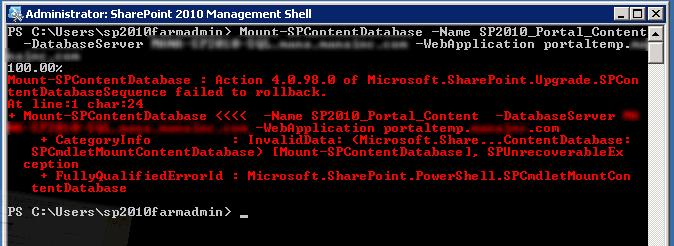
    While attempting to perform a SharePoint 2007 to SharePoint 2010 upgrade using the Database Attach Method this weekend, I ran into an error I hadn’t seen before:

    Action 4.0.98.0 of Microsoft.SharePoint.Upgrade.SPContentDatabaseSequence failed.

    Looking in to the Upgrade Error log file, I found the culprit:

    [powershell][/powershell][SPContentDatabaseSequence] [ERROR] [9/30/2012 1:03:13 PM]: Exception: The transaction log for database ‘SP2010_2007Portal_Content’ is full. To find out why space in the log cannot be reused, see the log_reuse_wait_desc column in sys.databases

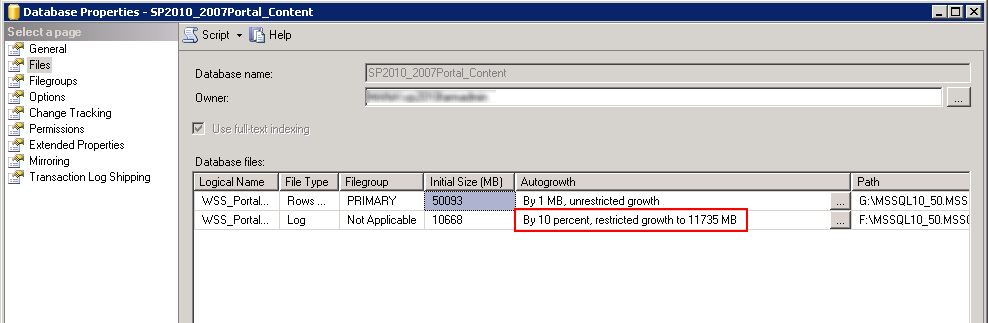
    It turns out that the database I had restored had a Maximum Size setting for the transaction log.  The Property pages for the Database revealed this fact:

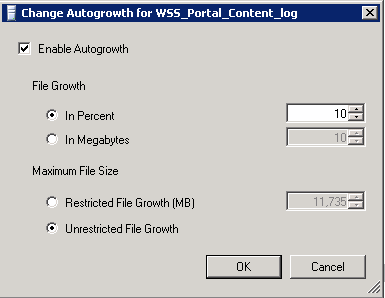
    I went ahead and changed the autogrowth settings to allow unrestricted growth.

    I then retried the Upgrade/Mount of the database and it went through without any errors.

  • Cheap storage, big files, and slow progress bars

    Is Gigabyte the new Megabyte?  It sure seems like that is the case.  The proliferation of inexpensive data storage has served to feed our data gluttony.  Under normal circumstances, that’s fine.  No problem.

    But then the day comes when you need to move 50GB of data from point A to point B.  And you spend ALL day watching progress bars.

    Compressing the file doesn’t help much either.  That just gives you another progress bar to watch.

    It seems that regardless of the status quo in the digital age, we still are tripped up by the physical world, be it a spinning disc, a magnet, a wire.

    So time elapses.  And files grow.

  • A basic deployment process for web apps

    Ah, deployment. That nervous moment when you release your code in to the wild to be used by, well, users.  You’ve done your part to test it yourself.  You’ve maybe even had a QA team or engineer take their best shot at finding bugs.  And now it’s time to kiss that baby good bye and promote it to the all grown up world of “Production”.

    Having a good strategy for deployment does two things.  First, a good repeatable process will ensure that anybody on the team should be able to issue a release.  This is important purely so you don’t get that call while you’re waiting in line at Sea World telling you that an emergency patch is needed and you have to guide the team through the release.  Secondly, a good deployment is prepared for the awful but very possible reality that you might have to abort the release and roll back to the current version.

    That said, here is a basic structure I use for preparing and deploying code.

    Get a clean build.
    This can come either from a build server, continuous integration platform, or a reliable developer’s system.  I primarily use Visual Studio, so I always Clean and Rebuild at the Solution level to ensure all the assemblies are refreshed.

    Create a label or tag to mark your code.
    For me, this is a basic audit trail so I have a timestamp of the release candidate version.  It also is a milestone from which I can merge to a Production branch if this release is the final version that goes live.

    Create your release package.
    Again, the actual packaging of your release can take several forms.  For some projects I use the Visual Studio ‘Publish’ feature, and have it output to the file system.  From there I’ll FTP the files to the production destination.  For other projects, we use a Setup package that creates an Installer.  This is mostly used when someone else such as a client is performing the deployment.  Pick a method that makes the most sense for your product, team, and production environment, and stick with it.

    Establish your release schedule.
    I tend to favor Friday night as a deployment timeframe mostly because it gives you the weekend to address any issues that may arise (when dealing with a business or corporate application).  Some of my clients do releases on Thursday mornings, others on Thursday nights.  There really is no right answer here, so again, find the most suitable time for your team and users and make it predictable.

    Put up a maintenance page.
    Depending on the size and effort required to execute the deployment, it may be necessary to put up a maintenance page informing visitors to your site that you’re making updates.  What you don’t want is people thinking your app is broken because they stumble upon it while your trying to release fixes or new features.  I love the ‘app_offline.htm’ file that IIS can use to show a maintenance page.  It’s simple, easy to customize, and is easy to turn off and on as needed.

    Back up code.
    Pulling a back up of your code pre-release is the contingency plan in case a rollback is needed.  It may or may not be necessary to back up every file, particularly if you have static or user-contributed content.  Ditto that for any log files that may be in your app.  But certainly the ‘guts’ of your app (meaning .DLLs, include files, etc.) and the ‘skin’ of your app (meaning any UI elements).

    Back up data.
    In many cases, if you have nightly database backups running, then the prior successful backup may be sufficient.  However, for highly transactional or critical data systems you may need to do an explicit data backup during your release window.

    Deploy code.
    FTP files across, or run the installer.

    Deploy data changes.
    Execute any database changes that are necessary using your database administration tool.

    Confirm.
    Confirming a successful release may simply mean checking a status page, or logging in and running through a series of transactions.  Your QA process will dictate what is required to verify a release in the production environment.

    Take down maintenance page.
    Rename the app_offline.htm file or otherwise set your app to live mode.

    Branch or merge in to Production code line.
    Now that you’re in Production, create or update a Production code branch with the code versions that have just been deployed so that you can address any production bugs without interfering with your ongoing development process.

    Announce your updates.
    In some form or another, let your users know what’s changed.  This might be a blog post, a status update, Tweet or email.  You’ve worked hard on this code and these features, so use this as a chance to get your users excited about using it.

    The process of releasing code to production will obviously vary according to the nature of your app, your user community, and your hosting or production environment.  But having a defined process will help make each release go smoother.

  • Why every app should have a status page.

    Many years ago, after receiving a promotion, I finally was able to accomplish a goal I had set out for myself.  I bought a BMW.  The 10 year old 325i the car I had fallen in love with and was now in a position to acquire.

    One of my favorite features of the car was a small collection of red lights positioned above the windshield.  Every time you’d start the car, these lights would all come on, then one by one they’d go out.  Each light corresponded to a certain system or status check being run.  If a light stayed lit, it meant you might have a tail light out, or be low on windshield washer fluid.  It was, in my view, one of those elegant demonstrations of German engineering.

    As a developer, getting status on a system is a fundamental part of ensuring proper behavior, diagnosing issues, and validating assumptions.  And so I have come to always ensure that the apps I develop have a status page, and I encourage you to do so as well.

    There are some essential things to check:

    1. Can I connect to the database?
    2. Can I upload a file and/or write to the file system?
    3. Can I connect to external services or APIs?
    4. Can I send an email?

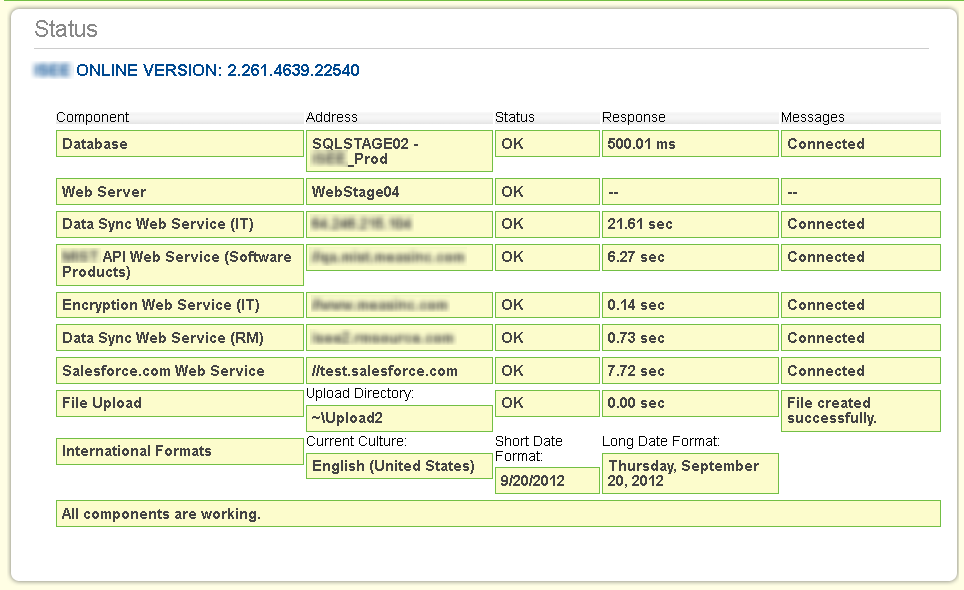
    Here is a sample from one of my projects.  You can see it runs through a series of checks, and shows results, response times, and any messages or alerts.

    Here’s the same page after I force an error.


    Your status page can be as detailed or general as you need.  What is important is to give yourself or your team enough information to make a decision or solve a problem.

    A few other things to consider –

    1. If your status page would contain sensitive information, be sure to properly mask or protect it.  It may or may not be feasible to put the status page in an area of your app that requires authentication, because if that authentication fails, you could never see the page.  But giving it an obscure Url or restricting its view to certain networks may be reasonable measures.

    2. Be sure to update your status page as you add features or new integration points to your app.

    3. Including a version number for your app is especially helpful when diagnosing problems.

    How are you or your team using status pages?  What must-have checks do your pages contain?

  • Writing meaningful comments and making your team happy.

    Perhaps not the most debated topic among developers, but one that is certainly on the list, is how, when and why to put comments in to code.

    One side argues that leaving comments and clues is a reasonable courtesy for the poor sap who inherits your code after you are long gone.

    The other side claims their code is so beautifully written and self-explanatory that no annotations are required.

    In my daily work, there are four places where commentary is possible:

    1. In the code itself
    2. On source control commits
    3. On bug reports or user stories
    4. On invoice time records

    All of these contexts have different levels of necessary comments, and different purposes (and consequences) tied to those comments.

    Inline comments

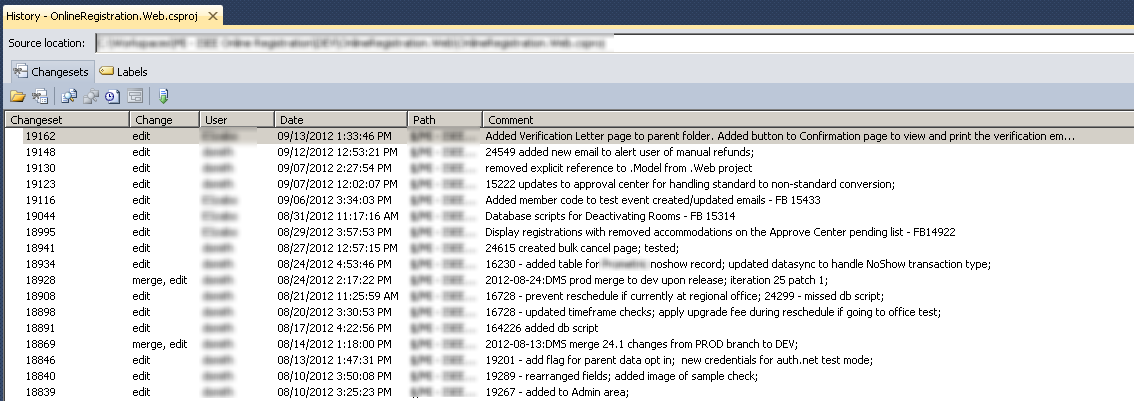
    By far the most common form of inline comment I use is to reference a bug ticket.  Whatever bug tracking or work item system you use, it probably assigns a nice integer to each item.  So when you fix that bug, you can notate the bug that is behind the change.

    //24549 send manual refund email if needed
    if (manualRefunds.Count > 0)
        SendManualRefundEmail(currentStudentTestEvent, manualRefunds);

    These comments make it trivial to find all the changes associated with a bug fix, simply by doing a search for the bug id.

    Another rule for inline comments is when, for whatever brilliant reason, a non-intuitive decision is made and implemented in code.  These comments are what make your code ‘senile-proof’.  What I mean by that is that we should just admit we can’t remember everything, and whether for our own sake or for the sake of our team, we need to record what we were thinking when we coded that magic number or unusual sequence.  Other times, we just point out the obvious.

    //2011-01-11:DMS - retrieve event to get test method
    Model.OpenTestEventSearch openTestEventSearch = TestEventBL.GetOpenTestEventSearch(studentTestEvent.TestEventID)
      .Where(o => o.TestGradeID == studentTestEvent.TestGradeID)
      .FirstOrDefault();

    Source Code Commits

    Checking code back in to the repository is a historic event.  In doing so, your code (working or not) is forever committed.  Just like any other monument, it’s nice to put a little plaque up to commemorate the event.

    In most cases, a commit will follow a bug fix, in which case your commit comments should also include the bug ID and a brief description of the fix.

    In other cases, you did something else, such as adding comments (!) or merged a code branch.  In those cases, a brief note about the change will help others on the team know why in the world you committed.

    Bug ticket closure

    In many (all?) bug tracking systems, when a case is resolved, the user has the opportunity to submit an update to the case.  Again, these notes can be concise, and can reference back to the revision or changeset in source control in which the code changes occurred to clear the case.  The level of detail required depends a lot on the other users of the bug tracking tool.  If end users will get updated upon the case closing, and they want an explanation of the fix, then you should give it to them.  However, if only project managers see it, and they are satisfied with a simple note saying “fixed in DEV branch”, then by all means, save the keystrokes.

    Time entries

    As a consultant, everything I do is tied to a time entry that ultimately ends up on an invoice to a client.  Therefore, when comments are put on time entries, they need to be ‘client friendly’.  In our case, however, the time entry is associated to a bug or work item, which has already been annotated, so the level of detail required is slightly less on the invoice.

    As all developers do, when we inherit someone else’s code, we are thankful for the information left for us by our predecessors.  It’s only reasonable to return the favor for those who come after us.

    What are your rules for commenting?  Add your thoughts below.

  • Change user’s display name in SharePoint 2007 using Powershell

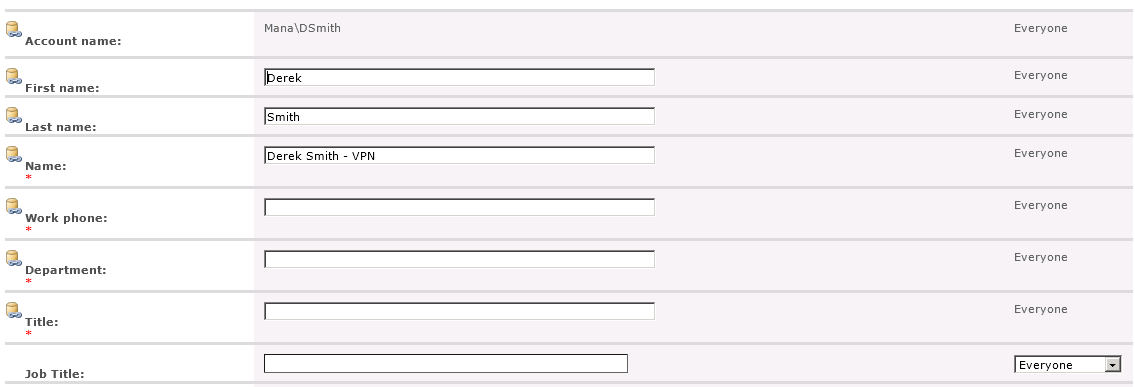
    I had an unusual case this week where a SharePoint 2007 installation did not have User Profile Synchronization enabled, but we needed to refresh (or more specifically, just update) SharePoint’s version of that user account with updated information from Active Directory.  We had two scenarios: a user who had gotten married and had a new last name, but the old last name was being displayed in SharePoint; and a user who was only being displayed using their DOMAIN\User format rather than a more user friendly display name.  Both of these issues have to do with synchronizing Active Directory and SharePoint, and both were overcome using some simple Powershell commands.

    Here’s what I learned along the way.

    1. In a SharePoint content database, there is a table called UserInfo, which (no surprise) contains information about the users that have been granted permission to the SharePoint site collection or its sites.  When a user is added to a SharePoint group, for instance, a query is made to Active Directory for that account, and the record is created in UserInfo.

    2.  The ‘People Picker’ control will display results from both Active Directory and the UserInfo table, with the UserInfo table taking a slight precedence.  In my case, where I had a user being shown with their DOMAIN\User formatted name, that value would display in the People Picker rather than the ‘Last, First’ variant of their name.

    3.  Most of the guidance on the web assumes that the User Profile Synchronization is in place.  This was not the case in my situation since this was a public facing site and did not have My Sites.

    The first thing I tried was to delete the user from the Site Collection, then re-add them to a group.  All this did was mark the user’s record in UserInfo as deleted, and when I re-added them it unmarked it.  There (so far as I could tell) was not a re-query to Active Directory that occurred as I would have hoped.

    So, since it is well established that thou shall not touch the SharePoint content database directly, I set out to find a way to edit the UserInfo record through a sanctioned method.  And that, even for SharePoint 2007, was Powershell.

    First, we need to load up the SharePoint Assemblies

    > [System.Reflection.Assembly]::LoadWithPartialName("Microsoft.SharePoint")

    Then we connect to our site collection

    > $site = New-Object Microsoft.SharePoint.SPSite("https://www.portal.com")

    Then we get the root web of the site collection

    > $web = $site.RootWeb

    We then need to connect to the User Information List, which corresponds to the UserInfo table.

    > $list = $web.Lists["User Information List"]

    And now we can select out the individual user record we want to update.  We’ll filter on the Account field, which should match our Active Directory user information.

    > $user = $list.Items | where {$_["Account"] -eq "DOMAIN\User"}

    If you look at the details of the $user object, you’ll see it has both a Name and DisplayName property.  Don’t be fooled, however, these fields are read only.  The one we want is Title.

    So, lets update the Title value for this user and save the changes.

    > $user["Title"] = "Lastname, Firstname"
    
    > $user.update()

    To check, I go back to the site and refresh the User Information List page – and sure enough, the updated value is applied.

    Finally, then, we need to clean up after ourselves and dispose of the SharePoint objects.

    > $web.Dispose()
    
    > $site.Dispose()

    This same approach can be used to update a user’s email address in SharePoint.

  • Building QuickBooks: How Intuit Manages 10 Million Lines of Code

    This was a great article about a large scale commercial product and the tools and techniques used to manage it.

    https://www.drdobbs.com/tools/building-quickbooks-how-intuit-manages-1/