Category: Videos

  • How to Use Cortana to control your Hue lights

    How to Use Cortana to control your Hue lights

    For Raleigh Code Camp this year I thought I’d stay in the realm of IoT, but also bring together some latest and greatest sweetness.  So my talk is titled “Hey Cortana, turn on the lights” and is a fun walkthrough of using Cortana, Universal Windows apps on Windows 10, the Azure Service Bus, and the Hue API to control your lighting with your voice.

    Here are all the reference articles I used in preparing the talk, and the slides, code, and video will be posted after the event.

    https://www.instructables.com/id/Use-RPi-Azure-and-Cortana-to-Automate-your-Home/?ALLSTEPS – this article was my inspiration and provides a good overview of the various elements of this solution.  I updated for Windows 10, and did not use a Raspberry Pi (though now with the RPi 2 and Windows 10 IoT Core it would not be that difficult.)

    https://talkitbr.com/2015/07/13/integrando-a-cortana-em-seu-aplicativo-windows-10/ – this one is in Portuguese, but still shows how to structure the Voice Command Definition file.

    https://dev.windows.com/en-us/speech – the official page for the Speech SDK from Microsoft

    https://msdn.microsoft.com/library/windows/apps/xaml/mt185598.aspx – Cortana Interactions – good overview with example for adding VCD to your Windows 10 app

    https://github.com/Microsoft/Windows-universal-samples/tree/master/Samples/CortanaVoiceCommand/cs/AdventureWorks/Common – this is a sample project provided by Microsoft.  It seemed slightly out of date, but was a good reference.

    https://www.visualstudio.com/products/visual-studio-community-vs – Download page for Visual Studio 2015 Community edition.  You need VS2015 to do universal app development

    https://www.developers.meethue.com/ – the Phillips Hue developer site.  To get access to the full API docs you’ll need to register, but they have a getting started page here as well.

    https://github.com/Q42/Q42.HueApi– a .NET wrapper for the Hue API.  I didn’t use this directly, but modeled my own wrapper after it, and found it helpful for some of the JSON handling.

    https://azure.microsoft.com/en-us/documentation/articles/service-bus-dotnet-how-to-use-topics-subscriptions/ – article with code samples for interacting with the Azure Service Bus as a publish and subscriber

    https://blogs.recneps.org/post/Raspberry-Pi2-Iot-Core-and-Azure-Service-Bus – example of using the Service Bus REST api since the full SDK is not yet available for Windows 10

    https://msdn.microsoft.com/en-us/library/azure/hh690922.aspx – how to send messages using REST to the Service bus queue

    https://azure.microsoft.com/en-us/documentation/articles/service-bus-queues-topics-subscriptions/ – another overview of the Service Bus with code samples


  • How does co-editing work in SharePoint 2013?

    How does co-editing work in SharePoint 2013?

    This week I was on site with a client discussing how to further leverage SharePoint in their business, and our conversation came around to how to better equip their field engineers and staff.  Specifically, I shared about the document library Sync feature.  One question came up regarding how SharePoint will reconcile changes if one employee modifies a file from their synchronized local copy, and another employee modifies the file directly from the Document Library.

    It’s a typical question and one I thought I’d answer using a live demo.  The video below illustrates how co-editing can work for both online and offline users.  I hope you find it helpful.

    (BTW: I’m going to try to start creating more of these kinds of Q&A videos, so if you have a suggestion for a question or explanation of a SharePoint feature, please comment on this post and share your idea.)

  • RDU Code Camp 2014 – Creating a content strategy for your personal brand

    RDU Code Camp 2014 – Creating a content strategy for your personal brand

    This year’s Code Camp was a great success and I was honored to be selected as a speaker for a 2nd year in a row.

    In this session I talk about how to differentiate yourself in the marketplace by establishing and maintaining a personal brand.  We had some great practical discussion, and I appreciate all who attended and asked questions.  For those who weren’t able to join us, the video of the session is offered below.

    Thanks to all the sponsors and volunteers for this year’s Code Camp.  It was a great time to learn, meet new people, and be reminded of how strong the .NET development community is around the Triangle.

  • What’s New in ASP.NET Identity and other valuable lessons learned

    This month I had the opportunity to fulfill one of my goals for 2014 by presenting to the Triangle .NET User group.  This was a fun night with some great interaction.

    However, I learned a valuable lesson.  No matter how much you prepare, there will always be something unexpected.

    I always record my presentations.  I do this for several reasons.  First, it gives me the ability to share with the community and benefit those who can’t attend an event.  Secondly, I use them to learn and improve my own presentation style and skill.  Watching myself, getting over-sensitive about my verbal tics (you know?), and seeing how I interact with the audience are all things that help me get better as a speaker.

    This event was no different – I’d gotten to the venue early, made sure all my slides and demos were in order, and checked Camtasia to make sure recording would work on the projector (every venue is different.)  Everything was in order.  I felt great.  I was ready to go.

    The first half of the presentation was going smooth.  I felt like I was hitting all my key points, and was getting good questions and comments from the audience.

    Then I took a question I shouldn’t have.  I tried to say “let’s come back to this afterwards” but somehow I got persuaded to diverge from my flow.  And then I went to set a breakpoint in the demo code so we could see what was happening.  I did something I do dozens of times a day while coding.  But this wasn’t a normal coding session.  In this case, pressing F9 to set that breakpoint in Visual Studio did more than I expected.  I didn’t catch it in the moment.

    Visual Studio never got that F9 keypress, because Camtasia intercepted it.  And did exactly what it was set to do.  It stopped recording.

    I went on with the rest of my presentation, still feeling good, still interacting with the audience, still hitting all my points and nailing my demos.  But it wasn’t recorded.

    After the meeting that night, I was at home, reviewing the video of the session.  And then it just went black.  I realized immediately what had happened.  I may have said a few words in frustration.  I was deeply disappointed.

    Eventually I composed myself and realized the teachable moment I had before me.  The opportunity to encourage others to check for the unexpected hiccup in their preparation.  To remind others and myself that the best laid plans still are vulnerable to mishaps.

    It reminded me of something I try to teach my children – that sometimes we learn best through our mistakes.

    So here is the first 47 minutes of my presentation that night.  I trust that even in its abbreviated form, there is value in the content.  But be assured, next time, Camtasia won’t listen to any hotkeys.

  • Responsive Design in SharePoint 2010 – WintellectNOW training

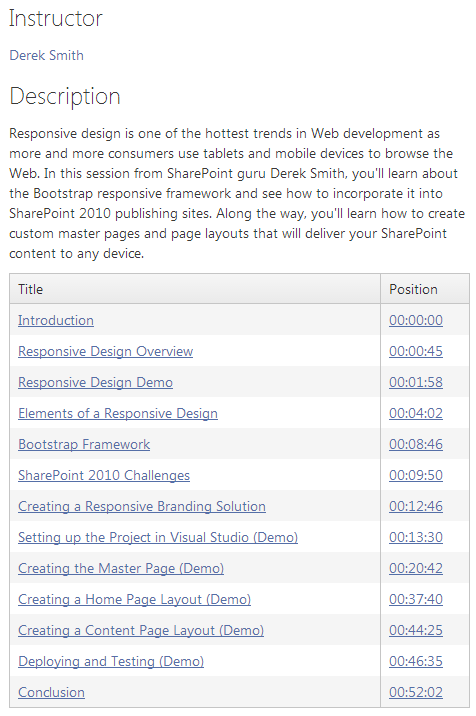
    Responsive Design in SharePoint 2010 – WintellectNOW training

    I’m very excited to have completed my first video training course for WintellectNOW.

    Responsive Design in SharePoint 2010

    This hour-long course is an in-depth look at using the Bootstrap responsive framework in SharePoint 2010 publishing sites.  It was a lot of fun to create, and will hopefully be the first of many that I produce.

    Here’s the course overview:

    wintellectnow-rwdsp2010-overview


    I’

  • Building data driven mobile apps with PhoneGap and WebApi – Raleigh Code Camp

    Building data driven mobile apps with PhoneGap and WebApi – Raleigh Code Camp

    This weekend I had the distinct privilege of speaking at Raleigh Code Camp.  This was a great day of technical sessions, meeting new people from the local .NET development community, and presenting.  I want to thank all the planners and volunteers from TriNUG who put on an awesome day.

    Here is a video of my presentation about using PhoneGap and Asp.Net WebApi to build data-driven mobile apps.

  • Responsive Design with Bootstrap in SharePoint 2010

    Responsive Design with Bootstrap in SharePoint 2010

    It was a real pleasure and privilege for me to present to the Triangle SharePoint User Group this month.

    In my presentation, I demonstrated how to incorporate the Bootstrap web application framework in to SharePoint master pages and page layouts in order to deliver a responsive browsing experience.

    The full video of my presentation is up on Youtube, and shown below.

    (Note: Unfortunately, when I switched from slides to the demo, and switched the display on my laptop from ‘Extend’ mode to ‘Duplicate’ mode, SnagIt didn’t pick up on the transition and the demo portion did not get recorded properly. Thankfully the code can be seen in the video up on the projection screen.  If anyone has specific questions or wants code samples, just add a comment for this post or send me a tweet.)

  • A video every serious developer should watch.

    If you have ever inherited somebody else handiwork and the code therein, you’ll appreciate what Robert C. Martin has to say in this keynote speech at the QCon London 2010 conference earlier this year.  It is well worth the hour.

    https://www.infoq.com/presentations/Robert-C.-Martin-Bad-Code