Category: Rants

  • Why are you lying to me Mr. Progress Bar?

    Why are you lying to me Mr. Progress Bar?

    As long as there have been computers that do work, there have been various forms for communicating progress to the user.

    I find these often to be a bunch of lying liars.

    When the bar fills up, the operation should be complete.  If it’s not, then don’t fill up the bar.

    Here’s the dialog that prompted this post. It is the installer of a Visual Studio update.  The bar is filled up, but clearly there is more work to be done.

    Web usability expert Jakob Nielsen writes about acceptable response times for actions done by a computer in his book published in 1993!

    In cases where the computer cannot provide fairly immediate response, continuous feedback should be provided to the user in form of a percent-done indicator [Myers 1985]. As a rule of thumb, percent-done progress indicators should be used for operations taking more than about 10 seconds. Progress indicators have three main advantages: They reassure the user that the system has not crashed but is working on his or her problem; they indicate approximately how long the user can be expected to wait, thus allowing the user to do other activities during long waits; and they finally provide something for the user to look at, thus making the wait less painful. This latter advantage should not be underestimated and is one reason for recommending a graphic progress bar instead of just stating the expected remaining time in numbers.

    To their credit, the Visual Studio team did provide a sprite so there was some motion while the installation took place.  But contrary to Nielsen’s suggestion, a filled up progress bar did not “make the wait less painful.”  It just plain irritated me.

    In the same way that developers should make their error messages meaningful, the status reported out to users should be useful and convey accurate information.


    Photo credit: https://www.flickr.com/photos/jacksonmedeiros/2719799718/

  • How to fail your consumer.

    How to fail your consumer.

    I must be in a bit of a ranting mode this week, but I couldn’t get past this one.

    So I’m implementing a web based calendar for a client.  I decide to use a fairly normal jQuery plugin called FullCalendar.  For the most part, it works as you’d expect.

    Query a list of events.  Render a calendar, with those events displayed.

    My client’s requirement stated that when the calendar loads, show the current month.  But every time it loads, we actually were showing the next month into the future.  March became April.

    Tracing, breakpoints, quickwatches.  All the date values look correct.  But the default month never matched the current month.

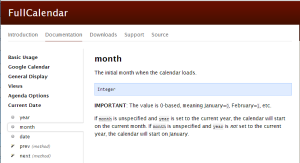
    Then I figured I would RTFM and to my amazement, I found this:

    full-calendar fail

    IMPORTANT: The value is 0 based, meaning January=0, February=1, etc.

    However, the year parameter is not zero-based, meaning 2013 == 2013.

    If I had to guess, the month value might be handled in an array.  And most arrays are zero-based.  Fine.  But when you alter the basic expectation of what a value is and how it behaves, you fail your user.  You waste their time.   You’ve wasted my time and my client’s money.

    Writing code that is consumed by others requires that you think about the consumer and making their life easier, not take shortcuts to make your life easier.  

    At least I can appreciate that this peculiarity was included in the otherwise admirable documentation.  And I definitely appreciate the overall functionality of this plugin.  But I don’t appreciate creating an exception when one doesn’t need to.  It smells of laziness, and as coders we can do better.

  • Cheap storage, big files, and slow progress bars

    Is Gigabyte the new Megabyte?  It sure seems like that is the case.  The proliferation of inexpensive data storage has served to feed our data gluttony.  Under normal circumstances, that’s fine.  No problem.

    But then the day comes when you need to move 50GB of data from point A to point B.  And you spend ALL day watching progress bars.

    Compressing the file doesn’t help much either.  That just gives you another progress bar to watch.

    It seems that regardless of the status quo in the digital age, we still are tripped up by the physical world, be it a spinning disc, a magnet, a wire.

    So time elapses.  And files grow.